Hi All,
After a long time a small and crisp article of how you can set MOAC in your custom OAF code. With release of R12 Oracle EBS has introduced a security feature in apps for multi -org access. Lets have a quick introduction of what is MOAC all abaout :
What is MOAC ?
---------------
The Access Control feature in Release 12 allows the user to enter or query records in one or more operating units without changing application responsibility. It is the system administrator’s discretion to either implement the feature or use the same multiple organizations profile option setting available before Release 12 by using the single operating unit mode (i.e. one operating unit for a responsibility).
In Release 12, the multiple organizations context value is no longer initialized by the FND_GLOBAL.APPS_INITIALIZE routine thereby reducing unnecessary context setting and resource consumption for applications that do not use operating unit context for data security.
To use the single operating unit mode, you must set the value for the "Initialization SQL Statement – Custom profile" to "mo_global.init('S',null);". This initializes the operating unit context based on the "MO: Operating Unit" profile option and the "MO: Security Profile" profile option must not be set.
Fresh install of Release 12 Application is enabled with multiple organizations, however, the system administrator must create operating units to use multi organizations sensitive application products. The user can create new operating units in the Accounting Setup Manager page in addition to HRMS’s Define Organizations page.
MOAC Implementation In Apps
-----------------------------
A new or fresh installation of an Oracle Applications instance does not automatically enable multiple organizations. Typically, the system administrator defines "MO: Operating Unit" profile at Responsibility and/or User level. The "organization_id" of the "MO: Operating Unit" profile option value filters the transactional data. The CLIENT_INFO application context space stores the multiple organizations context value.
Multi-Org views use the following WHERE clause to filter application records:
'org_id = substrb(userenv(''CLIENT_INFO''),1,10)'
MOAC in terms of OAF:
----------------------
Its very natural while developing extension or developing OAF custom pages , you may require quering of views, synonyms which use MOAC via VO.Also, it is possible that you might be calling some standard Oracle PL/SQL APIs which usually need MOAC context to be set.
Every transaction that requires multiple organizations must call the Multiple Organizations initialization in the root Application Module (AM).
Use the following declarative mechanism to initialize the multiple organizations settings for application teams to implement multiple organizations:
1. To enable multiple organizations for the root application module , go to the BC4J Application Module wizard - Properties section and specify the property as MULTIORG_ENABLED and value as either S (single operating unit mode) or M (Multiple operating unit mode).
2. Click Add, then Apply or OK.
On specifying this property, the OA Framework automatically initializes the multiple organizations context at the following appropriate program event points:
1. When reserving or activating the application module.
2. When initializing or validating the Oracle Applications user session.
You initialize the context once for each transaction and session and not instantiate for every page. If your transaction retains the root AM, then the above steps are the easiest to initialize multiple organizations.
If a transaction has multiple pages and the root AM is not retained, then you must call the method OADBTransaction.setMultiOrgAccess to initialize the multiple organizations context to help the user select an operating unit for a transaction.Here is how u can code in AM
OADBTransactionImpl trx = (OADBTransactionImpl)getOADBTransaction(); getOADBTransaction().setMultiOrgAccess(String.valueOf(trx.getOrgId()),String.valueOf(trx.getSecurityProfileId()),trx.getApplicationShortName());
If the operating unit the user selected must appear in the subsequent pages, then pass the curr_org_id to the page and use OADBTransaction.setMultiOrgPolicyContext method to set the operating unit context for the pages that need multiple organizations.
OADBTransactionImpl trx = (OADBTransactionImpl)getOADBTransaction();
getOADBTransaction().setMultiOrgPolicyContext("S",trx.getMultiOrgCurrentOrgId());
There is often a case when you create a custom application in apps under $JAVA_TOP, in order to keep all your customizations, lets say XXABC.When we make a new application in Apps like XXABC, we need to register the application for Multi-Org as single or multiple.
This is important, if we are defining new custom responsibilities on this application and we are planning to have custom, as well as seeded pages attached in this responsibility.If you have this scenario, where you custom responsibility is defined on custom application and it is using seeded pages as well as custom pages, you may face a error in your multi-org enabled seeded AM pages like :
oracle.apps.fnd.framework.OAException: Application: FND, Message Name: FND_GENERIC_MESSAGE. Tokens: MESSAGE = java.sql.SQLException: ORA-20001: SQL_PLSQL_ERROR: N, ROUTINE, MO_GLOBAL.INIT, N, ERRNO, -20001, N, REASON, ORA-20001: SQL_PLSQL_ERROR: N, ROUTINE, MO_GLOBAL.SET_ORG_ACCESS, N, ERRNO, -20001, N, REASON, ORA-20001: APP-FND-02938: Multi-organization routine failed to initialize a session for the product: &PRODUCT. Please inform your support representative.
ORA-06512: at "APPS.FND_MESSAGE", line 509
ORA-06512: at "APPS.MO_GLOBAL", line 36
ORA-06512: at "APPS.MO_GLOBAL", line 757
ORA-06512: at "APPS.MO_GLOBAL", line 700
ORA-06512: at line 1
The reason for this error is Oracle Apps seeded pages which have AM with multi-org enabled,if you will check the AM xml file , they use MULTIORG_ENABLED as Y and not as S or M . This is because in Apps, you can directly register an application with multi-org enabled in table fnd_mo_product_init by using API :
-- To enable MO access in a custom application:
begin
FND_MO_PRODUCT_INIT_PKG.register_application('XXABC','SEED','N');
end;
Since, seeded applications are already registered here, its not a problem, when you run seeded pages because MULTIORG_ENABLED=Y in AM sets correct multi org access, but in case of custom application/responsibility based on custom application running seeded pages throws error, because the custom application XXABC is not registered in table fnd_mo_product_init. Hence , in order to run both seeded pages and custom pages fine i.e. code work correctly in case of MULTIORG_ENABLED=Y (used by seeded pages) or MULTIORG_ENABLED=S/M (custom pages), register the custom application using the FND_MO_PRODUCT_INIT_PKG.register_application API.
Monday, April 6, 2009


Wednesday, January 7, 2009
ADF 10g : How to show faces message both globally and below the UI component.
Hi all,
Welcome again, after a long time I am finally back on blogging.. in the time of economy recession!I think I was not able to update my blog from almost last 7-8 months because of various resons, joining new company, working new technologies of Oracle Fusion and working on multiple projects simultaneously.
In the past 6 months i have worked as an architect on two ADF 10G projects. When I compare ADF with my OA Framework experience, I find ADF to be much more challenging as well as flexible to mold as per the requirement in your project.
From now I would be coming up with small articles on ADF which will be helpful, to develop useful APIs by product architects, so that other developers would be able to use them , without worrying about the actual implementation.
One task in ADF which looks very easy, is showing of different jsf messages.One great feature of ADF is that Faces messages can be shown globally at the top of page, as well as just below the UI ADF bean, which is very illustrative for users.
CASE I:Showing Global Message in an ADF page
-----------------------------------------------
1)af:messages tag is used for showing global messages in an ADF page.This tag is created automatically whenever you drop an input widget from the
Data Control Palette. However, if you need to insert the tag, simply insert the
following code within the afh:body tag:

2. In the Property Inspector set the following attributes:
■ globalOnly: By default ADF Faces displays global messages (i.e., messages
that are not associated with components) followed by individual component
messages. If you wish to display only global messages in the box, set this
attribute to true. Component messages will continue to display with the
associated component.
■ message: The main message text that displays just below the message box
title, above the list of individual messages.
■ text: The text that overrides the default title of the message box.
Code for displaying global Faces message :
//You need to enter error description
String error_decp="";
//You need to enter error detail
String error_detail="";
//Get current instance of faces context
FacesContext fc = FacesContext.getCurrentInstance();
//Creating faces message with description and detail
FacesMessage message = new FacesMessage(error_descp, error_detail);
//setting severity of message,i.e. message type
message.setSeverity(FacesMessage.SEVERITY_ERROR);
//Adding message to faces context.
fc.addMessage(null, message);
CASE II:Showing Faces Message in an ADF UI COMPONENT along with global error message:
-----------------------------------------------------------------------------
a)JSF Validator :
-------------------
This approcah is typically used when you have same kind of validation repeatdly in your code. Lets take a very generic example you need to verify that the entered number should have precision of 2 decimal places, i.e. whatever number user enters should have 2 digits after decimal.You can write a jsf validator for this register in the application and use in any othe pages. If you are new to JSF validator just search google you will find numerous examples of how to write a JSF validator.
b) Directly adding message with UI component based of custom code in backing bean:
--------------------------------------------------------------------------------
i)In complex data UI components like table:
--------------------------------------------
String global_error=""; //Error that need to be shown at top of the page
String component_error="";//Error that need to be shown on the component
String formId="";// Id of Form bean
String TableId="";//Id of table bean
String rowIndex="";//String value of row index
String message="";//message type
FacesContext fc = FacesContext.getCurrentInstance();
FacesMessage message = new FacesMessage(global_error, component_error);
message.setSeverity(FacesMessage.SEVERITY_ERROR);
fc.addMessage(formId+":"+TableId+":"+String.valueOf(rowIndex)+":"+ComponentId, message);
ii)In simple data UI components like input text:
---------------------------------------------
FacesContext fc = FacesContext.getCurrentInstance();
FacesMessage message = new FacesMessage(global_error, component_error);
message.setSeverity(FacesMessage.SEVERITY_ERROR);
fc.addMessage(formId+":"+ComponentId, message);
I hope the above article has provided a brief description about how to show global and UI specific messages , you can use in ADF via JSF APIs.
Welcome again, after a long time I am finally back on blogging.. in the time of economy recession!I think I was not able to update my blog from almost last 7-8 months because of various resons, joining new company, working new technologies of Oracle Fusion and working on multiple projects simultaneously.
In the past 6 months i have worked as an architect on two ADF 10G projects. When I compare ADF with my OA Framework experience, I find ADF to be much more challenging as well as flexible to mold as per the requirement in your project.
From now I would be coming up with small articles on ADF which will be helpful, to develop useful APIs by product architects, so that other developers would be able to use them , without worrying about the actual implementation.
One task in ADF which looks very easy, is showing of different jsf messages.One great feature of ADF is that Faces messages can be shown globally at the top of page, as well as just below the UI ADF bean, which is very illustrative for users.
CASE I:Showing Global Message in an ADF page
-----------------------------------------------
1)af:messages tag is used for showing global messages in an ADF page.This tag is created automatically whenever you drop an input widget from the
Data Control Palette. However, if you need to insert the tag, simply insert the
following code within the afh:body tag:

2. In the Property Inspector set the following attributes:
■ globalOnly: By default ADF Faces displays global messages (i.e., messages
that are not associated with components) followed by individual component
messages. If you wish to display only global messages in the box, set this
attribute to true. Component messages will continue to display with the
associated component.
■ message: The main message text that displays just below the message box
title, above the list of individual messages.
■ text: The text that overrides the default title of the message box.
Code for displaying global Faces message :
//You need to enter error description
String error_decp="";
//You need to enter error detail
String error_detail="";
//Get current instance of faces context
FacesContext fc = FacesContext.getCurrentInstance();
//Creating faces message with description and detail
FacesMessage message = new FacesMessage(error_descp, error_detail);
//setting severity of message,i.e. message type
message.setSeverity(FacesMessage.SEVERITY_ERROR);
//Adding message to faces context.
fc.addMessage(null, message);
CASE II:Showing Faces Message in an ADF UI COMPONENT along with global error message:
-----------------------------------------------------------------------------
a)JSF Validator :
-------------------
This approcah is typically used when you have same kind of validation repeatdly in your code. Lets take a very generic example you need to verify that the entered number should have precision of 2 decimal places, i.e. whatever number user enters should have 2 digits after decimal.You can write a jsf validator for this register in the application and use in any othe pages. If you are new to JSF validator just search google you will find numerous examples of how to write a JSF validator.
b) Directly adding message with UI component based of custom code in backing bean:
--------------------------------------------------------------------------------
i)In complex data UI components like table:
--------------------------------------------
String global_error=""; //Error that need to be shown at top of the page
String component_error="";//Error that need to be shown on the component
String formId="";// Id of Form bean
String TableId="";//Id of table bean
String rowIndex="";//String value of row index
String message="";//message type
FacesContext fc = FacesContext.getCurrentInstance();
FacesMessage message = new FacesMessage(global_error, component_error);
message.setSeverity(FacesMessage.SEVERITY_ERROR);
fc.addMessage(formId+":"+TableId+":"+String.valueOf(rowIndex)+":"+ComponentId, message);
ii)In simple data UI components like input text:
---------------------------------------------
FacesContext fc = FacesContext.getCurrentInstance();
FacesMessage message = new FacesMessage(global_error, component_error);
message.setSeverity(FacesMessage.SEVERITY_ERROR);
fc.addMessage(formId+":"+ComponentId, message);
I hope the above article has provided a brief description about how to show global and UI specific messages , you can use in ADF via JSF APIs.
Wednesday, July 16, 2008
Hide "Privacy Link" and "Copy right information" from dialog page!
Explaination By Kali:
Try the following,
Login with the user who has functional administrator and goto pesonalization tab,
query the document path,
/oracle/apps/fnd/framework/webui/OAFooter
press go, once you get the doc name /oracle/apps/fnd/framework/webui/OAFooter
click on Personalize Page icon,
Clear all other default values and uncheck the site check box,
and select OAFWK_DIALOG_PG in Function.
Then apply,
You will get personalization struction the /oracle/apps/fnd/framework/webui/OAFooter at Function OAFWK_DIALOG_PG level,
Now change the rendered propertly to false for Privacy Link and Copy right.
Then check the dialog page.
Try the following,
Login with the user who has functional administrator and goto pesonalization tab,
query the document path,
/oracle/apps/fnd/framework/webui/OAFooter
press go, once you get the doc name /oracle/apps/fnd/framework/webui/OAFooter
click on Personalize Page icon,
Clear all other default values and uncheck the site check box,
and select OAFWK_DIALOG_PG in Function.
Then apply,
You will get personalization struction the /oracle/apps/fnd/framework/webui/OAFooter at Function OAFWK_DIALOG_PG level,
Now change the rendered propertly to false for Privacy Link and Copy right.
Then check the dialog page.
Sunday, July 6, 2008
Creation Of the Anonymous page Introduction( By Kalimuthu Vellaichamy,Senior Consultant,Oracle )
1.1 Purpose
This document explains the OAFramework (ver 5.7 H for Apps 11.5.9 and 5.10 for Apps 11.5.10) Anonymous User page (like registration page) development and deployment in an instance and pack for the other instances.
This document assumes that the reader has a basic knowledge of OA Frmework page creation and deployment.
1.2 Background
This document should be used for creating Guest User pages and all type of registration pages. When this document fails to cover a topic, recommendations from OA Framework Development Team should be followed. If you have a Guest user page to display that does not require a user to log in.
1.3 Related Documents
1. OA Framework Developers’ Guide
2 Creation Of the Anonymous page
2.1 New page with anonymous user setup.
To create a page with anonymous setup we should have a standard OAFramework page with all the components required for the page.
We have to create the function for this page.
Let us consider a Registration page NewEmpRegistrationPG.xml and the registered function for this page is NEW_EMP_REGN.
We have to change the following properties for the MainRN for the page.
Rendered: ${oa.FunctionSecurity. NEW_EMP_REGN}
Security Mode: selfSecured

Use the following command to upload the page to the instance,
java oracle.jrad.tools.xml.importer.XMLImporter -username -password -dbconnection "(DESCRIPTION=(ADDRESS=(PROTOCOL=tcp)(HOST=)(PORT=))(CONNECT_DATA=(SID=)))" -rootdir ./ -rootPackage
Example.
java oracle.jrad.tools.xml.importer.XMLImporter NewEmpRegistrationPG.xml -username apps -password apps -dbconnection "(DESCRIPTION=(ADDRESS=(PROTOCOL=tcp)(HOST=I3SN021E.idc.oracle.com)(PORT=1610))(CONNECT_DATA=(SID=scmtrng)))" -rootdir ./ -rootPackage /xxt/oracle/apps/pon/registration/webui
2.2 Create a function for the new page
Use functional administrator (Self Service) or using system administrator (Forms) responsibility and create a function for the uploaded page.
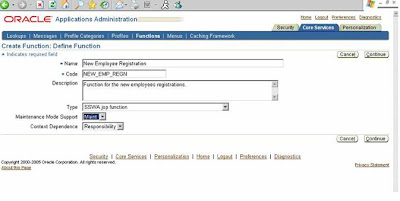
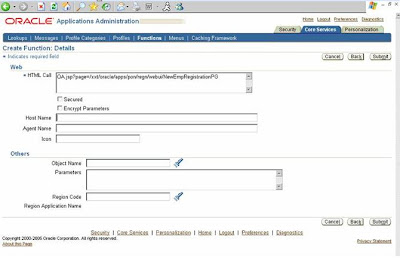
After the function creation we have to add this function to a menu and the menu has to be granted to GUEST user.
2.3 Add the function to a new menu
Use fuctional administrator responsibility to create a new Menu. Add the created function with this new menu.
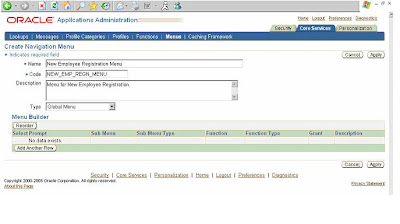

Now we are ready with the menu that is having a function, which points to a page which we want to access without the user log in.
If you want to give access to more than one page you can add, as many functions to the menu, like below.
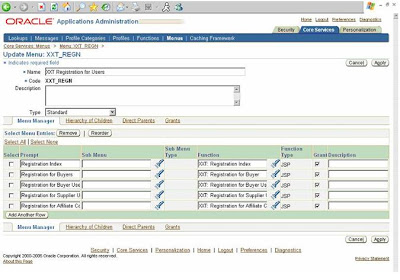
2.4 Create Grant for the created menu.
To create Grant for the menu we have created now, use Security Tab in the functional administrator responsibility. Follow the below mentioned steps.
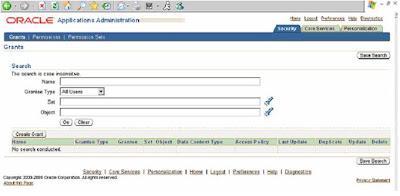
Step I: Log on to Application with Functional Administrator Responsibility and click on functional administrator responsibility. Click on “Create Grant” button (To create a Global Grant)
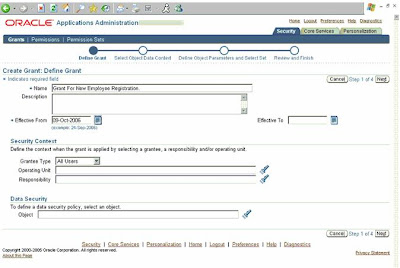
Step II: Enter the Grant Name and select Grantee Type as “All Users” and click “Next”
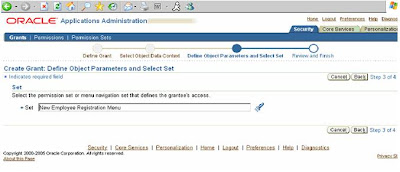
Step III: Enter the User Menu Name of the newly created Menu and click “Next”
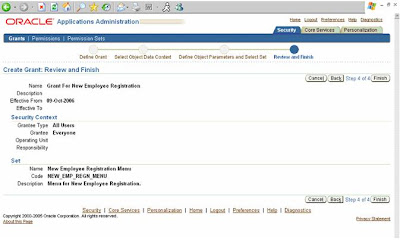
Step IV : Click “Finish” button
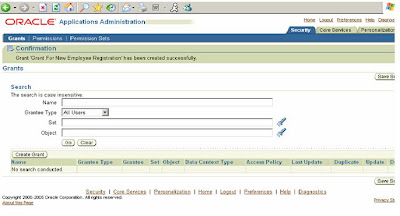
Step V: Again click on “Create Grant” (To create Guest Grant)
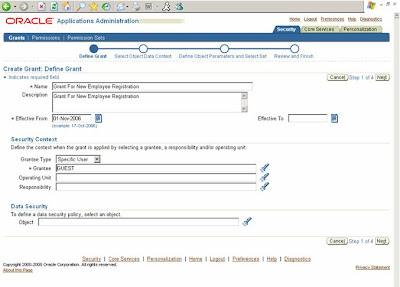
Step VI : Enter the Grant Name and select Grantee Type as “Specific User”. The page refreshes to display a new field called “Grantee” (If the page fails to refresh click “Next” button to go to the next screen and click “Back” button on the next screen to come back to this screen)
Enter “GUEST” in the “Grantee” field and click “Next”
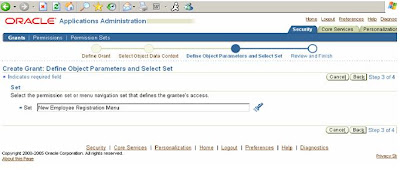
Step VII: Enter the User Menu Name of the newly created Menu and click “Next”
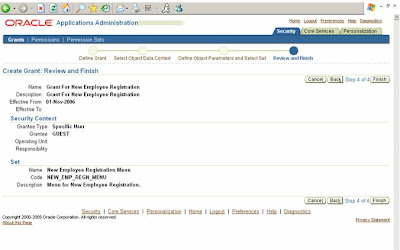
Step VIII : Click “Finish” button
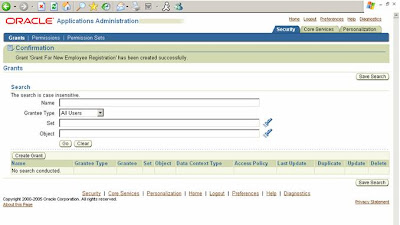
Step IX: Grant creations successfully completed.
3 Download and Upload the Grant
Following command used to download the created Grant.
FNDLOAD apps/apps 0 Y DOWNLOAD $FND_TOP/patch/115/import/afsload.lct XXTGUESTGRT_US.ldt GRANT GNT_MENU_NAME= NEW_EMP_REGN_MENU
To upload this grant into a new instance upload the page and the menu as usual and upload the Grant for the menu using the following command.
Following command used to upload the downloaded Grant.
FNDLOAD apps/apps 0 Y UPLOAD $FND_TOP/patch/115/import/afsload.lct XXTGUESTGRT_US.ldt
No we can access the newly created page without login into the applications using the following URL.
http://: /OA_HTML/OA.jsp?OAFunc=NEW_EMP_REGN
This document explains the OAFramework (ver 5.7 H for Apps 11.5.9 and 5.10 for Apps 11.5.10) Anonymous User page (like registration page) development and deployment in an instance and pack for the other instances.
This document assumes that the reader has a basic knowledge of OA Frmework page creation and deployment.
1.2 Background
This document should be used for creating Guest User pages and all type of registration pages. When this document fails to cover a topic, recommendations from OA Framework Development Team should be followed. If you have a Guest user page to display that does not require a user to log in.
1.3 Related Documents
1. OA Framework Developers’ Guide
2 Creation Of the Anonymous page
2.1 New page with anonymous user setup.
To create a page with anonymous setup we should have a standard OAFramework page with all the components required for the page.
We have to create the function for this page.
Let us consider a Registration page NewEmpRegistrationPG.xml and the registered function for this page is NEW_EMP_REGN.
We have to change the following properties for the MainRN for the page.
Rendered: ${oa.FunctionSecurity. NEW_EMP_REGN}
Security Mode: selfSecured

Use the following command to upload the page to the instance,
java oracle.jrad.tools.xml.importer.XMLImporter
Example.
java oracle.jrad.tools.xml.importer.XMLImporter NewEmpRegistrationPG.xml -username apps -password apps -dbconnection "(DESCRIPTION=(ADDRESS=(PROTOCOL=tcp)(HOST=I3SN021E.idc.oracle.com)(PORT=1610))(CONNECT_DATA=(SID=scmtrng)))" -rootdir ./ -rootPackage /xxt/oracle/apps/pon/registration/webui
2.2 Create a function for the new page
Use functional administrator (Self Service) or using system administrator (Forms) responsibility and create a function for the uploaded page.


After the function creation we have to add this function to a menu and the menu has to be granted to GUEST user.
2.3 Add the function to a new menu
Use fuctional administrator responsibility to create a new Menu. Add the created function with this new menu.


Now we are ready with the menu that is having a function, which points to a page which we want to access without the user log in.
If you want to give access to more than one page you can add, as many functions to the menu, like below.

2.4 Create Grant for the created menu.
To create Grant for the menu we have created now, use Security Tab in the functional administrator responsibility. Follow the below mentioned steps.

Step I: Log on to Application with Functional Administrator Responsibility and click on functional administrator responsibility. Click on “Create Grant” button (To create a Global Grant)

Step II: Enter the Grant Name and select Grantee Type as “All Users” and click “Next”

Step III: Enter the User Menu Name of the newly created Menu and click “Next”

Step IV : Click “Finish” button

Step V: Again click on “Create Grant” (To create Guest Grant)

Step VI : Enter the Grant Name and select Grantee Type as “Specific User”. The page refreshes to display a new field called “Grantee” (If the page fails to refresh click “Next” button to go to the next screen and click “Back” button on the next screen to come back to this screen)
Enter “GUEST” in the “Grantee” field and click “Next”

Step VII: Enter the User Menu Name of the newly created Menu and click “Next”

Step VIII : Click “Finish” button

Step IX: Grant creations successfully completed.
3 Download and Upload the Grant
Following command used to download the created Grant.
FNDLOAD apps/apps 0 Y DOWNLOAD $FND_TOP/patch/115/import/afsload.lct XXTGUESTGRT_US.ldt GRANT GNT_MENU_NAME= NEW_EMP_REGN_MENU
To upload this grant into a new instance upload the page and the menu as usual and upload the Grant for the menu using the following command.
Following command used to upload the downloaded Grant.
FNDLOAD apps/apps 0 Y UPLOAD $FND_TOP/patch/115/import/afsload.lct XXTGUESTGRT_US.ldt
No we can access the newly created page without login into the applications using the following URL.
http://
Tuesday, July 1, 2008
Disable Browser Back Button in OAF
Hi all,
These days I am so muh busy with SOA, ADF and Bpel projects that I do not get time to write articles. But recently helped a friend in old team for fixing browser back button in one of his OAF transaction pages which was creating error in his page.
Basically a small trick used in various J2EE projects in javascript helps to sort of nullify the browser back button in oaf page. This is what you need to do,
Put following code in process request of OAF page :
OABodyBean bodyBean = (OABodyBean) OAPageContext.getRootWebBean();
String javaS = “javascript:window.history.forward(1);”;
bodyBean.setOnLoad(javaS);
Actually window.history.forward(1) would push the current page ahead in the "visited pages history". A negative number like -1 would restore the previous visited page from browser's cache. Zero is relative to the current (displayed) page. Positive numbers would navigate forward.
If the page number (positive) does not exist in history, your browser will create an entry "copying" the current page to it and setting it as the current entry, so that the previous and actual are the same.
Using window.history.forward(1) does not disable "Back button". The button will work BUT as this script runs on page loading, it will send you "ahead" the history, which stored URL (or page) is the same. So it works like a "Refresh" button, without actually refreshing content from server, but just restoring from cache.
Hope this helps all.
These days I am so muh busy with SOA, ADF and Bpel projects that I do not get time to write articles. But recently helped a friend in old team for fixing browser back button in one of his OAF transaction pages which was creating error in his page.
Basically a small trick used in various J2EE projects in javascript helps to sort of nullify the browser back button in oaf page. This is what you need to do,
Put following code in process request of OAF page :
OABodyBean bodyBean = (OABodyBean) OAPageContext.getRootWebBean();
String javaS = “javascript:window.history.forward(1);”;
bodyBean.setOnLoad(javaS);
Actually window.history.forward(1) would push the current page ahead in the "visited pages history". A negative number like -1 would restore the previous visited page from browser's cache. Zero is relative to the current (displayed) page. Positive numbers would navigate forward.
If the page number (positive) does not exist in history, your browser will create an entry "copying" the current page to it and setting it as the current entry, so that the previous and actual are the same.
Using window.history.forward(1) does not disable "Back button". The button will work BUT as this script runs on page loading, it will send you "ahead" the history, which stored URL (or page) is the same. So it works like a "Refresh" button, without actually refreshing content from server, but just restoring from cache.
Hope this helps all.
Wednesday, May 14, 2008
Some facts About R12 OAF techstack
As Applications R12 is maturing and stabilising , we are seeing more and more R12 projects coming up. One prominent question I find very often on Oracle OAF forums as well as e mails, is there any change is relation of OA Framework components development and deployment in R12?? Here is list of some changes which you will come across while working on any R12 project:
1)Apache Jserv is upgraded to OC4J(Oracle Containers for Java) server in R12.
2)How to enable log in R12?Since there is no Jserv as in 11i, there is no more dependency on jserv.properties file for enabling of log.Here are the details how to enable log on R12:
In R12,
Goto $ORA_CONFIG_HOME/10.1.3/opmn/conf
take the backup of opmn.xml
edit opmn.xml for data id="java-options" and add the following:
-DAFLOG_ENABLED=true -DAFLOG_LEVEL=statement
-DAFLOG_MODULE=fnd%
-DAFLOG_FILENAME=/tmp/aflog.txt -Djbo.debugoutput=console
The log message should get written in,
$INST_TOP/logs/ora/10.1.3/opmn/oacore_default_group_1/oacorestd.out
3)How to add custom classpath in OC4J server classpath ?
Add an entry in,
$ORA_CONFIG_HOME/10.1.3/j2ee/oacore/application-deployments/oacore/orion-application.xml
< library path="..."/ >
prepending the existing library path.Modifying orion-application.xml works only if you manually go and modify it. But whenever we run autoconfig orion-application.xml is generated again and it does not have the custom jar files which we had specified.
In case you need to permanently add a custom classpath to the OC4J instances then you need to update the template file
$FND_TOP/admin/template/orion_application_xml_1013.tmp
There would be some set of entries with tags like
< library path="%s_oacore_prepend_classpath%" />
< library path="%s_javatop%" />
< library path="%s_af_jlib%/ojdigsig.zip" />
< library path="%s_oacore_append_classpath%" />
< library path="%s_weboh_oh%/j2ee/forms/applications/forms/formsweb/WEB-INF/lib/frmsrv.jar" />
< library path="%s_tools_oh%/forms/java/frmxlate.jar" />
< library path="%s_weboh_oh%/j2ee/oafm/applications/mapviewer/web/WEB-INF/lib/mvclient.jar" />
you can add your custom path like this after all the existing library path entires
where /abc/xyz/classpath.jar is the path for your custom libraries
4)Autocompilation setting of jsp files in R12.
In file
$INST_TOP/ora/10.1.3/j2ee/oacore/application-deployments/oacore/html/orion-web.xml
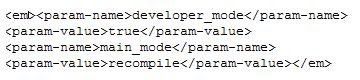
afterwards please restart apache
$ADMIN_SCRIPTS_HOME/adapcctl.sh stopall
$ADMIN_SCRIPTS_HOME/adapcctl.sh startall
now, whenever you change a character in your jsp, this will immediate reflect your output. In production environments this setting is not recommended.
4)Steps for Manual compilation of jsp in R12.
> cd $FND_TOP/patch/115/bin
> ojspCompile.pl --compile -s hello.jsp
5) Why R12 uses two Oracle homes in ?
There is an interesting article on Steven Chan's blog on this which explains y Oracle introduced 10.1.3 and 10.1.2 both in R12 Application server archietecture:
Why Use Two ORACLE_HOMEs for Release 12's Application Tier?
6)DBC file location in R12:
$INST_TOP/appl/fnd/12.0.0/secure
7)Bouncing OC4J server, for OAF to pick latest class and xml files.
In R12, there are two scripts which need to run to bounce the HTTP server and make OC4J container pick latest class files instead of one as in 11i, we only need to run adapcctl.sh shell script to bounce Apache Jserv.
Since in R12 Jserv is replaces by OC4J container, we need to run two scripts:
1)Script which is responsible for bouncing Oracle HTTP Server (powered by Apache).(adapcctl.sh)
2)Script which responsible for bouncing OC4J container (adoacorectl.sh)
So basically, here is the sequence of steps you need to do :
1)adapcctl.sh stop
2)adoacorectl.sh stop
3)adapcctl.sh start
4)adoacorectl.sh start
All these scripts are in $ADMIN_SCRIPTS_HOME
1)Apache Jserv is upgraded to OC4J(Oracle Containers for Java) server in R12.
2)How to enable log in R12?Since there is no Jserv as in 11i, there is no more dependency on jserv.properties file for enabling of log.Here are the details how to enable log on R12:
In R12,
Goto $ORA_CONFIG_HOME/10.1.3/opmn/conf
take the backup of opmn.xml
edit opmn.xml for data id="java-options" and add the following:
-DAFLOG_ENABLED=true -DAFLOG_LEVEL=statement
-DAFLOG_MODULE=fnd%
-DAFLOG_FILENAME=/tmp/aflog.txt -Djbo.debugoutput=console
The log message should get written in,
$INST_TOP/logs/ora/10.1.3/opmn/oacore_default_group_1/oacorestd.out
3)How to add custom classpath in OC4J server classpath ?
Add an entry in,
$ORA_CONFIG_HOME/10.1.3/j2ee/oacore/application-deployments/oacore/orion-application.xml
< library path="..."/ >
prepending the existing library path.Modifying orion-application.xml works only if you manually go and modify it. But whenever we run autoconfig orion-application.xml is generated again and it does not have the custom jar files which we had specified.
In case you need to permanently add a custom classpath to the OC4J instances then you need to update the template file
$FND_TOP/admin/template/orion_application_xml_1013.tmp
There would be some set of entries with tags like
< library path="%s_oacore_prepend_classpath%" />
< library path="%s_javatop%" />
< library path="%s_af_jlib%/ojdigsig.zip" />
< library path="%s_oacore_append_classpath%" />
< library path="%s_weboh_oh%/j2ee/forms/applications/forms/formsweb/WEB-INF/lib/frmsrv.jar" />
< library path="%s_tools_oh%/forms/java/frmxlate.jar" />
< library path="%s_weboh_oh%/j2ee/oafm/applications/mapviewer/web/WEB-INF/lib/mvclient.jar" />
you can add your custom path like this after all the existing library path entires
where /abc/xyz/classpath.jar is the path for your custom libraries
4)Autocompilation setting of jsp files in R12.
In file
$INST_TOP/ora/10.1.3/j2ee/oacore/application-deployments/oacore/html/orion-web.xml

afterwards please restart apache
$ADMIN_SCRIPTS_HOME/adapcctl.sh stopall
$ADMIN_SCRIPTS_HOME/adapcctl.sh startall
now, whenever you change a character in your jsp, this will immediate reflect your output. In production environments this setting is not recommended.
4)Steps for Manual compilation of jsp in R12.
> cd $FND_TOP/patch/115/bin
> ojspCompile.pl --compile -s hello.jsp
5) Why R12 uses two Oracle homes in ?
There is an interesting article on Steven Chan's blog on this which explains y Oracle introduced 10.1.3 and 10.1.2 both in R12 Application server archietecture:
Why Use Two ORACLE_HOMEs for Release 12's Application Tier?
6)DBC file location in R12:
$INST_TOP/appl/fnd/12.0.0/secure
7)Bouncing OC4J server, for OAF to pick latest class and xml files.
In R12, there are two scripts which need to run to bounce the HTTP server and make OC4J container pick latest class files instead of one as in 11i, we only need to run adapcctl.sh shell script to bounce Apache Jserv.
Since in R12 Jserv is replaces by OC4J container, we need to run two scripts:
1)Script which is responsible for bouncing Oracle HTTP Server (powered by Apache).(adapcctl.sh)
2)Script which responsible for bouncing OC4J container (adoacorectl.sh)
So basically, here is the sequence of steps you need to do :
1)adapcctl.sh stop
2)adoacorectl.sh stop
3)adapcctl.sh start
4)adoacorectl.sh start
All these scripts are in $ADMIN_SCRIPTS_HOME
Monday, May 12, 2008
E-Business Suite Application Development Using Oracle Application Framework (OAF) and Application Development Framework (ADF
Latest Update of the much discussed topic on Oracle OA Technology Forum ... which techstack to use OAF or ADF till the time Oracle comes up with Fusion Release, is that Oracle has now released official guidelines for using which framework OAF/ADF while building your custom web application.This white paper is there on the metalink:
E-Business Suite Application Development Using Oracle Application Framework (OAF) and Application Development Framework (ADF) (Metalink Note 563047.1)
E-Business Suite Application Development Using Oracle Application Framework (OAF) and Application Development Framework (ADF) (Metalink Note 563047.1)
Subscribe to:
Posts (Atom)