Recently, a friend had a requirement of a customization in a seeded page where he needs to put some validation on a table column which was actually OAMessageDateFieldBean.
This is quite simple and generic requirement , when he called me ...I told him that since , this has to be done in seeded Oracle page and fire action elements can't be added by personalization,he just needs to extend the CO and attach fire action programatically to the OAMessageDateFieldBean in process request and then can handle his logic of validation in process form request.But the tricky part came when he told me his code is not compiling since setFireActionForSubmit API is absent in OAMessageDateFieldBean class.
I just wondered how is it possible since this bean allows me to configure fireaction decalaratively, then there should be an API of doing it programatically too in the bean. Then I remebered with each UIX bean Oracle also gives a helper class, which can usually be instantiated by using getHelper(), on the bean instance.
Whenever you are in such situations , its worth while to look into bean helper classes. Ok.. so here is the code how you can configure firection on OAMessageDateFieldBean programatically :
//In process request.
//getting table bean instance
OATableBean t=(OATableBean)webBean.findChildRecursive("< table bean id >");
//getting OAMessageDateFieldBean inside
//table bean
OAMessageDateFieldBean expDate = (OAMessageDateFieldBean)t.findChildRecursive("< OAMessageDateFieldBean id >");
//hard-parameters for fire action
//it will help us to identify if action
//has occured or not
Hashtable params = new Hashtable (1);
params.put ("XX_ACTION","XXX");
//bound value parameters for fire action
// basically the primary key attribute of
//VO to get the row from which action has occured
//eg, lets say the VO attribute is Visit id AND
//that is primary key
Hashtable paramsWithBinds = new Hashtable(1);
paramsWithBinds.put ("XX_PRIMARY",new OADataBoundValueFireActionURL((OAWebBeanData) expDate, "{$VisitId}"));
//Most important---
//taking helper class instance
// there we get the API to attach fire action.
expDate.getHelper().setFireActionForSubmit(expDate,"delete",params, paramsWithBinds,false,false);
//In Process form request
if(pageContext.getParameter("XX_ACTION")!=null)
{
//by this primary key we can retrieve the VO row at which
// action occured and utilise the other column data
// for validations.
String primary_key=pageContext.getParameter("XX_PRIMARY");
.......
//finally releasing the parameters from
//current pagecontext requesr
pagecontext.removeParameter("XX_ACTION");
pagecontext.removeParameter("XX_PRIMARY");
}
Alternative : There is a alternate way to attach PPR/Fireaction to any bean.Use static methods in class OAWebBeanUtils, like
OAWebBeanUtils.getFirePartialActionForSubmit()
OAWebBeanUtils.getFireActionForSubmit()
and then use
// finally set it on your bean
bean.setAttributeValue
(PRIMARY_CLIENT_ACTION_ATTR, fireAction);
Happy coding....!
Showing posts with label OAF. Show all posts
Showing posts with label OAF. Show all posts
Wednesday, April 7, 2010


Wednesday, March 17, 2010
Concept of Nested AM.
Hi All,
Writing a theoretical article after a long time. What inspired me to write.... hmm... lot of questioning developers :) . Ok, my target with this article is to make an OA Framework developer understand what is nested AM? and how can u find a nested AM instance from master/root AM instance? What we should know about it while developing extensions or new pages.
What is a Nested AM?
--------------------------------------
An application module may be a root application module or a nested application module. A root application module is not contained in another applicatin module. It provides transaction context for all objects contained in it. It may optionally contain nested application modules. A root application module is created through JNDI calls.
A nested application module is contained in another application module. The containing application module is referred to as the parent application module. If one traverses this containership ancestry, one will eventually find the root application module (which does not have a parent application module). A nested application module uses the transaction context provided by the root application module. Thus, data modifications performed in application modules parented by one root application module will commit or rollback together.
Transaction
-----------------------------
Associated with the root application module is the Transaction object, which provides this transaction context. From any (root or nested) application module, the user can retrieve the transaction object through a call to getOADBTransaction(). In reality, getOADBTransaction() first locates the root application module and then returns the transaction object from it.
The transaction object manages connection to database and entity caches. Thus, changes made through one view object are visible to other view objects as long as these view objects all parented by the one root application module. In contrast, if two view objects are parented by two separate root application modules, then changes made through the view object will not be seen by the second view object until the changes are committed to database through the first root application module and the second VO executes query (to retrieve the most up-to-date data from database).
Creating Application Module
--------------------------------------------------------------------
A root application module is created by:
Finding the application module home through JNDI.
Calling create() on the application module home.
Here is a sample code to create a root application module:
java.util.Hashtable env = new java.util.Hashtable();
// Add environment entries into env...
javax.naming.Context ic = new InitialContext(env);
// 'defName' is the JNDI name for the application module
// definition from which the root application module is to
// be created
String defName = ...;
oracle.jbo.ApplicationModuleHome home = ic.lookup(defName);
oracle.jbo.ApplicationModule am = home.create();
One creates a nested application module by calling createApplicationModule on the parent Application module.
How nested AM concept works in OAF :
---------------------------------------------------------------------------
Now to associate a nested application module with a region,
specify either of the following properties:
1) AM Instance -- The application module instance name as specified in the application module's data
model. For example, PoSummaryAM1.
2) AM Definition -- The fully qualified name of the application module instance. For example,
oracle.apps.fnd.framework.toolbox.tutorial.server.PoSummaryAM.
If you specify the AM Instance property, OA Framework attempts to find and return the AM instance with the given name. It searches the application module associated with the parent web bean.
If you specify the AM Definition property, OA Framework assigns a generated AM instance name to the nested region. This name is comprised of the following values:
a) Region code of the associated nested region (if the region was originally created in AK)
b) Nested region application ID
c) Nested region ID
d) AM definition name.
OA Framework checks to see if the nested AM with the system-generated name has been already created under the application module of the parent web bean. If the instance is not found, OA Framework creates and uses a nested AM with the system-generated name. Otherwise, it reuses the pre-existing AM with the system generated
name.
When specifying both the AM Instance and AM Definition properties
if a matching AM instance is found, OA Framework compares its definition with the AM Definition property value. If there is a mismatch, OA Framework throws an exception.
If a matching AM instance is not found, OA Framework creates and returns a nested application module instance with the given AM instance name and the definition.
Code for finding nested AM instance in root AM :
-----------------------------------------------------------------------------------
Hence, whenever you are trying to find an nested AM instance linked to a OA region under pagelayout region, please check the am defination and am instance property of that region, because only then you would be able to have a idea of name of nested AM instance. It can be system generated AM instance or name given by developer for AM instance.So, you need to confirm this from the three cases mentioned in the previous article.For debugging purposes, you can get the list if Application modules in root AM and print there names ,too :
String[] nestedAMNames = parentAM.getApplicationModuleNames();
// If you want to retrieve all currently loaded nested Application Modules
ApplicationModule[] nestedAMs = new ApplicationModule[nestedAMNames.length];
for (int i = 0; i < nestedAMNames.length; i++)
{
nestedAM[i] = parentAM.findApplicationModule(nestedAMNames[i]);
}
Otherwise for finding nested AM instance by :
ApplicationModule nestedAM = parentAM.findApplicationModule("MyNestedAM");
This concept is really helpful while doing extensions in OAF, as you may have to find a nested AM in a CO of particular OAF region.You can always find root AM of the page in any controller using pagecontext.getRootApplicationModule().
I hope after reading this article nested AM conecept becomes crystal clear in your mind :), if not raise queries, and I will try to answer you.
Wednesday, February 3, 2010
Attaching AutoSubmit Property to a OA page.
Hi All,
I recently received couple of mails where people more or less have the requirement like :
1) Data of the page gets refresh every 10 sec automatically.
2) Data of the page should be autosaved every 10 seconds etc.
This is very similar to autosave feature of microsoft word or popular email websites like yahoo and google. A small javascript function can do this for you.Here are the steps how, you can achieve this functionality in an OAF page :
/**
* @param pageContext -current page context in CO
* @param evt_name - javascript event will be registered with this name.
* @param time_in_milli_sec - time in milli sec after which page will refresh
* e.g if you wanna submit page every 10 sec , enter 10000
* This api should be used in process request and not process form request.
*/
public void attachAutoSubmitPropertyToPage(OAPageContext pageContext,
String evt_name,
String time_in_milli_sec)
{
OABodyBean bodyBean = (OABodyBean) pageContext.getRootWebBean();
String javaS =
"javascript:setTimeout(\"submitForm('DefaultFormName',0,{'" +
evt_name + "':'Y'});\"," + time_in_milli_sec + ");";
bodyBean.setOnLoad(javaS);
}
/**
* @param pageContext -current page context in CO
* @param event_name - pass javascript event name that you registered
* in process request.
* @return return true/false accordinging whether the event has occured or not.
* This api call should be there in process form request.
*/
public boolean isAutoSubmitEvent(OAPageContext pageContext,
String event_name)
{
boolean b = false;
String s =
pageContext.getRenderingContext().getServletRequest().getParameter(event_name);
if (!((s == null) || ("".equals(s.trim()))))
{
if("Y".equals(s))
{
b = true;
pageContext.removeParameter(event_name);
}
}
return b;
}
Then , in process request add the api call
public void processRequest(OAPageContext pageContext, OAWebBean webBean)
{
super.processRequest(pageContext, webBean);
// see javadocs for parameter description
//10000 for 10 sec as we are paaing in millsec
attachAutoSubmitPropertyToPage(pageContext,"XX_EVT","10000");
.
.
.
}
In process form request... you can catch this event in every 10 sec:
public void processFormRequest(OAPageContext pageContext,
OAWebBean webBean)
{
super.processFormRequest(pageContext, webBean);
.
.
if(isAutoSubmitEvent(pageContext,"XX_EVT"))
{
// YOUR LOGIC TO SAVE THE PAGE CONTENTS.
//or to refresh the data... etc
}
I hope this is interesting and will help developers of such kind of requirement.
Happy Coding..!
Tuesday, January 12, 2010
Upload file to Application server using OAFileUploadBean instead of Database
Sometimes, there can be requirement , where you need to upload a file on unix server, instead of database.You can use OAMessageFileUploadBean for this. Add the upload bean in your OAF UIX page. Add an additional submit button bean which will be responsible for file Upload.
On click on this button in process form request call the following method with parameters as described in CO. So, copy this method in CO and then call it in process form request on this submit button click like
uploadFileToServer(pageContext, "item3",
"/xx/app/sss/x");
Here is the method for upload:
/**
* @param pageContext is current pagecontext in CO
* @param fileuploadBeanId is item id of file upload bean
* @param server_dir_path is abslute path on unix server
* where file needs to be written.eg "/xx/xxx/xxx"
*/
public void uploadFileToServer(OAPageContext pageContext,
String fileuploadBeanId,
String server_dir_path)
{
DataObject fileUploadData =
(DataObject) pageContext.getNamedDataObject(fileuploadBeanId);
if(fileUploadData!=null)
{
String uFileName =
(String) fileUploadData.selectValue(null, "UPLOAD_FILE_NAME");
String contentType =
(String) fileUploadData.selectValue(null, "UPLOAD_FILE_MIME_TYPE");
File file = new File(server_dir_path, uFileName);
FileOutputStream output = null;
InputStream input = null;
try
{
output = new FileOutputStream(file);
BlobDomain uploadedByteStream =
(BlobDomain) fileUploadData.selectValue(null, uFileName);
input = uploadedByteStream.getInputStream();
for (int bytes = 0; bytes < uploadedByteStream.getLength(); bytes++)
{
output.write(input.read());
}
}
catch (Exception e)
{
e.printStackTrace();
}
finally
{
try
{
if (input != null)
{
input.close();
}
if (output != null)
{
output.close();
output.flush();
}
}
catch (Exception ez)
{
ez.printStackTrace();
}
}
}
}
Please understand when you run a page from jdeveloper, you are running page on local oc4j server of jdeveloper and not the actual application server of Oracle Apps, hence if this code is run from jdeveloper then you need to give path of your local desktop folder and file will be uploaded in it and not the actual application server.
To test this code actually you should deploy your page onto Oracle apps application server and access the page from a responsibility by registering it as a function , because then it will use Oracle Apps Application Unix server and upload file there.
Happy coding ...!
Tuesday, January 5, 2010
Giving download option to user for a file at a particular location on Application Server
Hi All,
This is a very generic scenario where a user wants to download a particular file from application server. eg- We are storing some report output or some pdf documents in particular location in unix application server. Now in a OAF page on press of a button/link I wanna give user download option for this file.
For this requirement you can use following method, from process form request, u need to pass pagecontext and other parameters as described in method.
//on button click in process form request
//call this method
downloadFileFromServer(
pageContext,--pagecontext
"/xx/xxx/ssss/120devg.pdf",--full file path with file name and ext
"120devg.pdf" --file name with extension
);
Make sure that the folder/files you are giving user option to download through this method, have 777 rights in UNIX server.
Copy these two methods in your CO for the above API to work:
/**
* @param pageContext the current OA page context
* @param file_name_with_path - this is fully qualified file name with its path on unix application
* server. eg "/xxcrp/xxapplcrp/mukul/abc.pdf"
* @param file_name_with_ext - this is file name with extension, you wanna display user
* for download. eg- i wanna display the abc.pdf file download with name five_point_someone.pdf
* then I can pass this as "five_point_someone.pdf"
*/
public void downloadFileFromServer(OAPageContext pageContext,
String file_name_with_path,
String file_name_with_ext)
{
HttpServletResponse response =
(HttpServletResponse) pageContext.getRenderingContext().getServletResponse();
if (((file_name_with_path == null) ||
("".equals(file_name_with_path))))
{
throw new OAException("File path is invalid.");
}
File fileToDownload = null;
try
{
fileToDownload = new File(file_name_with_path);
}
catch (Exception e)
{
throw new OAException("Invalid File Path or file does not exist.");
}
if (!fileToDownload.exists())
{
throw new OAException("File does not exist.");
}
if (!fileToDownload.canRead())
{
throw new OAException("Not Able to read the file.");
}
String fileType = getMimeType(file_name_with_ext);
response.setContentType(fileType);
response.setContentLength((int)fileToDownload.length());
response.setHeader("Content-Disposition",
"attachment; filename=\"" + file_name_with_ext +
"\"");
InputStream in = null;
ServletOutputStream outs = null;
try
{
outs = response.getOutputStream();
in = new BufferedInputStream(new FileInputStream(fileToDownload));
int ch;
while ((ch = in.read()) != -1)
{
outs.write(ch);
}
}
catch (IOException e)
{
// TODO
e.printStackTrace();
}
finally
{
try
{
outs.flush();
outs.close();
if (in != null)
{
in.close();
}
}
catch (Exception e)
{
e.printStackTrace();
}
}
}
/**
* @param s
* @return file mime type from its name
*/
public String getMimeType(String s)
{
int i = s.lastIndexOf(".");
if (i > 0 && i < s.length() - 1)
{
String s1 = s.substring(i + 1);
if (s1.equalsIgnoreCase("amr"))
{
return "audio/amr";
}
if (s1.equalsIgnoreCase("mid"))
{
return "audio/midi";
}
if (s1.equalsIgnoreCase("mmf"))
{
return "application/vnd.smaf";
}
if (s1.equalsIgnoreCase("qcp"))
{
return "audio/vnd.qcelp";
}
if (s1.equalsIgnoreCase("hqx"))
{
return "application/mac-binhex40";
}
if (s1.equalsIgnoreCase("cpt"))
{
return "application/mac-compactpro";
}
if (s1.equalsIgnoreCase("doc"))
{
return "application/msword";
}
if (s1.equalsIgnoreCase("jsp"))
{
return "application/jsp";
}
if (s1.equalsIgnoreCase("oda"))
{
return "application/oda";
}
if (s1.equalsIgnoreCase("pdf"))
{
return "application/pdf";
}
if (s1.equalsIgnoreCase("ai"))
{
return "application/postscript";
}
if (s1.equalsIgnoreCase("eps"))
{
return "application/postscript";
}
if (s1.equalsIgnoreCase("ps"))
{
return "application/postscript";
}
if (s1.equalsIgnoreCase("ppt"))
{
return "application/powerpoint";
}
if (s1.equalsIgnoreCase("rtf"))
{
return "application/rtf";
}
if (s1.equalsIgnoreCase("bcpio"))
{
return "application/x-bcpio";
}
if (s1.equalsIgnoreCase("vcd"))
{
return "application/x-cdlink";
}
if (s1.equalsIgnoreCase("Z"))
{
return "application/x-compress";
}
if (s1.equalsIgnoreCase("cpio"))
{
return "application/x-cpio";
}
if (s1.equalsIgnoreCase("csh"))
{
return "application/x-csh";
}
if (s1.equalsIgnoreCase("dcr"))
{
return "application/x-director";
}
if (s1.equalsIgnoreCase("dir"))
{
return "application/x-director";
}
if (s1.equalsIgnoreCase("dxr"))
{
return "application/x-director";
}
if (s1.equalsIgnoreCase("dvi"))
{
return "application/x-dvi";
}
if (s1.equalsIgnoreCase("gtar"))
{
return "application/x-gtar";
}
if (s1.equalsIgnoreCase("gz"))
{
return "application/x-gzip";
}
if (s1.equalsIgnoreCase("hdf"))
{
return "application/x-hdf";
}
if (s1.equalsIgnoreCase("cgi"))
{
return "application/x-httpd-cgi";
}
if (s1.equalsIgnoreCase("jnlp"))
{
return "application/x-java-jnlp-file";
}
if (s1.equalsIgnoreCase("skp"))
{
return "application/x-koan";
}
if (s1.equalsIgnoreCase("skd"))
{
return "application/x-koan";
}
if (s1.equalsIgnoreCase("skt"))
{
return "application/x-koan";
}
if (s1.equalsIgnoreCase("skm"))
{
return "application/x-koan";
}
if (s1.equalsIgnoreCase("latex"))
{
return "application/x-latex";
}
if (s1.equalsIgnoreCase("mif"))
{
return "application/x-mif";
}
if (s1.equalsIgnoreCase("nc"))
{
return "application/x-netcdf";
}
if (s1.equalsIgnoreCase("cdf"))
{
return "application/x-netcdf";
}
if (s1.equalsIgnoreCase("sh"))
{
return "application/x-sh";
}
if (s1.equalsIgnoreCase("shar"))
{
return "application/x-shar";
}
if (s1.equalsIgnoreCase("sit"))
{
return "application/x-stuffit";
}
if (s1.equalsIgnoreCase("sv4cpio"))
{
return "application/x-sv4cpio";
}
if (s1.equalsIgnoreCase("sv4crc"))
{
return "application/x-sv4crc";
}
if (s1.equalsIgnoreCase("tar"))
{
return "application/x-tar";
}
if (s1.equalsIgnoreCase("tcl"))
{
return "application/x-tcl";
}
if (s1.equalsIgnoreCase("tex"))
{
return "application/x-tex";
}
if (s1.equalsIgnoreCase("textinfo"))
{
return "application/x-texinfo";
}
if (s1.equalsIgnoreCase("texi"))
{
return "application/x-texinfo";
}
if (s1.equalsIgnoreCase("t"))
{
return "application/x-troff";
}
if (s1.equalsIgnoreCase("tr"))
{
return "application/x-troff";
}
if (s1.equalsIgnoreCase("roff"))
{
return "application/x-troff";
}
if (s1.equalsIgnoreCase("man"))
{
return "application/x-troff-man";
}
if (s1.equalsIgnoreCase("me"))
{
return "application/x-troff-me";
}
if (s1.equalsIgnoreCase("ms"))
{
return "application/x-troff-ms";
}
if (s1.equalsIgnoreCase("ustar"))
{
return "application/x-ustar";
}
if (s1.equalsIgnoreCase("src"))
{
return "application/x-wais-source";
}
if (s1.equalsIgnoreCase("xml"))
{
return "text/xml";
}
if (s1.equalsIgnoreCase("ent"))
{
return "text/xml";
}
if (s1.equalsIgnoreCase("cat"))
{
return "text/xml";
}
if (s1.equalsIgnoreCase("sty"))
{
return "text/xml";
}
if (s1.equalsIgnoreCase("dtd"))
{
return "text/dtd";
}
if (s1.equalsIgnoreCase("xsl"))
{
return "text/xsl";
}
if (s1.equalsIgnoreCase("zip"))
{
return "application/zip";
}
if (s1.equalsIgnoreCase("au"))
{
return "audio/basic";
}
if (s1.equalsIgnoreCase("snd"))
{
return "audio/basic";
}
if (s1.equalsIgnoreCase("mpga"))
{
return "audio/mpeg";
}
if (s1.equalsIgnoreCase("mp2"))
{
return "audio/mpeg";
}
if (s1.equalsIgnoreCase("mp3"))
{
return "audio/mpeg";
}
if (s1.equalsIgnoreCase("aif"))
{
return "audio/x-aiff";
}
if (s1.equalsIgnoreCase("aiff"))
{
return "audio/x-aiff";
}
if (s1.equalsIgnoreCase("aifc"))
{
return "audio/x-aiff";
}
if (s1.equalsIgnoreCase("ram"))
{
return "audio/x-pn-realaudio";
}
if (s1.equalsIgnoreCase("rpm"))
{
return "audio/x-pn-realaudio-plugin";
}
if (s1.equalsIgnoreCase("ra"))
{
return "audio/x-realaudio";
}
if (s1.equalsIgnoreCase("wav"))
{
return "audio/x-wav";
}
if (s1.equalsIgnoreCase("pdb"))
{
return "chemical/x-pdb";
}
if (s1.equalsIgnoreCase("xyz"))
{
return "chemical/x-pdb";
}
if (s1.equalsIgnoreCase("gif"))
{
return "image/gif";
}
if (s1.equalsIgnoreCase("ief"))
{
return "image/ief";
}
if (s1.equalsIgnoreCase("jpeg"))
{
return "image/jpeg";
}
if (s1.equalsIgnoreCase("jpg"))
{
return "image/jpeg";
}
if (s1.equalsIgnoreCase("jpe"))
{
return "image/jpeg";
}
if (s1.equalsIgnoreCase("png"))
{
return "image/png";
}
if (s1.equalsIgnoreCase("tiff"))
{
return "image/tiff";
}
if (s1.equalsIgnoreCase("tif"))
{
return "image/tiff";
}
if (s1.equalsIgnoreCase("ras"))
{
return "image/x-cmu-raster";
}
if (s1.equalsIgnoreCase("pnm"))
{
return "image/x-portable-anymap";
}
if (s1.equalsIgnoreCase("pbm"))
{
return "image/x-portable-bitmap";
}
if (s1.equalsIgnoreCase("pgm"))
{
return "image/x-portable-graymap";
}
if (s1.equalsIgnoreCase("ppm"))
{
return "image/x-portable-pixmap";
}
if (s1.equalsIgnoreCase("rgb"))
{
return "image/x-rgb";
}
if (s1.equalsIgnoreCase("xbm"))
{
return "image/x-xbitmap";
}
if (s1.equalsIgnoreCase("xpm"))
{
return "image/x-xpixmap";
}
if (s1.equalsIgnoreCase("xwd"))
{
return "image/x-xwindowdump";
}
if (s1.equalsIgnoreCase("html"))
{
return "text/html";
}
if (s1.equalsIgnoreCase("htm"))
{
return "text/html";
}
if (s1.equalsIgnoreCase("txt"))
{
return "text/plain";
}
if (s1.equalsIgnoreCase("rtx"))
{
return "text/richtext";
}
if (s1.equalsIgnoreCase("tsv"))
{
return "text/tab-separated-values";
}
if (s1.equalsIgnoreCase("etx"))
{
return "text/x-setext";
}
if (s1.equalsIgnoreCase("sgml"))
{
return "text/x-sgml";
}
if (s1.equalsIgnoreCase("sgm"))
{
return "text/x-sgml";
}
if (s1.equalsIgnoreCase("mpeg"))
{
return "video/mpeg";
}
if (s1.equalsIgnoreCase("mpg"))
{
return "video/mpeg";
}
if (s1.equalsIgnoreCase("mpe"))
{
return "video/mpeg";
}
if (s1.equalsIgnoreCase("qt"))
{
return "video/quicktime";
}
if (s1.equalsIgnoreCase("mov"))
{
return "video/quicktime";
}
if (s1.equalsIgnoreCase("avi"))
{
return "video/x-msvideo";
}
if (s1.equalsIgnoreCase("movie"))
{
return "video/x-sgi-movie";
}
if (s1.equalsIgnoreCase("ice"))
{
return "x-conference/x-cooltalk";
}
if (s1.equalsIgnoreCase("wrl"))
{
return "x-world/x-vrml";
}
if (s1.equalsIgnoreCase("vrml"))
{
return "x-world/x-vrml";
}
if (s1.equalsIgnoreCase("wml"))
{
return "text/vnd.wap.wml";
}
if (s1.equalsIgnoreCase("wmlc"))
{
return "application/vnd.wap.wmlc";
}
if (s1.equalsIgnoreCase("wmls"))
{
return "text/vnd.wap.wmlscript";
}
if (s1.equalsIgnoreCase("wmlsc"))
{
return "application/vnd.wap.wmlscriptc";
}
if (s1.equalsIgnoreCase("wbmp"))
{
return "image/vnd.wap.wbmp";
}
if (s1.equalsIgnoreCase("css"))
{
return "text/css";
}
if (s1.equalsIgnoreCase("jad"))
{
return "text/vnd.sun.j2me.app-descriptor";
}
if (s1.equalsIgnoreCase("jar"))
{
return "application/java-archive";
}
if (s1.equalsIgnoreCase("3gp"))
{
return "video/3gp";
}
if (s1.equalsIgnoreCase("3g2"))
{
return "video/3gpp2";
}
if (s1.equalsIgnoreCase("mp4"))
{
return "video/3gpp";
}
}
return "application/octet-stream";
}
Happy coding...! I hope this helps! :)
Implementing Export Button Functionality Programatically
Hi All,
There is often a requirement to export a VO data or a UI table data into a CSV file. OA Framework provides export button bean for the this functionality, which works fine in almost 99% of the cases. But sometimes, you might face a scenario when ur table u have complex UIs like switcher/hide show columns etc, where the standard export functionality doesn't work or you want some columns not to come in export, or you wanna change some data on export.
In such cases, you can implement the export functionality programatically by yourself.Copy paste the following method in the page CO and pass appropriate parameters to get exported data.You can change this method, as per your requirement, to get data/format data or change data.
By default this method will bring all columns of fetch rows of VO instance,although you can use param hidden_attrib_list to pass attributes which you don't want to be included in csv file.You can call this method in the submit button event that you have made in process form request like :
//see api parameter details in the method below.
//array of Vo attr names which need not be written in csv file
String ss[]={xID,xName};
downloadCsvFile(pageContext, "XxAdatVisSearchVO",null, "MAX",ss);
/**
* @param pageContext
* @param view_inst_name is the view object instance name like VO1 etc in root AM.
* Make sure the VO instance name you have passed should be same as in Root AM.
* @param file_name_without_ext - pass for eg for abc.csv , u should pass "abc".If no
* name is passed then by default it will pick "Export.csv".
* @param max_size -pass "MAX", if u want all rows, pass null to get fetch row count
* else pass integer number like 10,20 etc , the number of rows you want to fetch.
* @param hidden_attrib_list -Array of VO attribute names which doesn't need to be shown/written in
* csv file.
*/
public void downloadCsvFile(OAPageContext pageContext,
String view_inst_name,
String file_name_without_ext,
String max_size, String[] hidden_attrib_list)
{
OAViewObject v =
(OAViewObject) pageContext.getRootApplicationModule().findViewObject(view_inst_name);
if (v == null)
{
throw new OAException("Could not find View object instance " +
view_inst_name + " in root AM.");
}
if (v.getFetchedRowCount() == 0)
{
throw new OAException("There is no data to export.");
}
String file_name = "Export";
if (!((file_name_without_ext == null) ||
("".equals(file_name_without_ext))))
{
file_name = file_name_without_ext;
}
HttpServletResponse response =
(HttpServletResponse) pageContext.getRenderingContext().getServletResponse();
response.setContentType("application/text");
response.setHeader("Content-Disposition",
"attachment; filename=" + file_name + ".csv");
PrintWriter pw = null;
try
{
pw = response.getWriter();
int j = 0;
int k = 0;
boolean bb = true;
if ((max_size == null) || ("".equals(max_size)))
{
k = Integer.parseInt(pageContext.getProfile("VO_MAX_FETCH_SIZE"));
bb = false;
}
else if ("MAX".equals(max_size))
{
bb = true;
}
else
{
k = Integer.parseInt(max_size);
bb = false;
}
//Making header
AttributeDef[] a = v.getAttributeDefs();
StringBuffer cc = new StringBuffer();
ArrayList exist_list = new ArrayList();
for (int l = 0; l < a.length; l++)
{
boolean zx = true;
if (hidden_attrib_list != null)
{
for (int z = 0; z < hidden_attrib_list.length; z++)
{
if (a[l].getName().equals(hidden_attrib_list[z]))
{
zx = false;
exist_list.add(String.valueOf(a[l].getIndex()));
}
}
}
if (zx)
{
cc.append("\"" + a[l].getName() + "\"");
cc.append(",");
}
}
String header_row = cc.toString() + "\n";
pw.write(header_row);
for (OAViewRowImpl row = (OAViewRowImpl) v.first(); row != null;
row = (OAViewRowImpl) v.next())
{
j++;
StringBuffer b = new StringBuffer();
for (int i = 0; i < v.getAttributeCount(); i++)
{
boolean cv = true;
for (int u = 0; u < exist_list.size(); u++)
{
if (String.valueOf(i).equals(exist_list.get(u).toString()))
{
cv = false;
}
}
if (cv)
{
Object o = row.getAttribute(i);
if (!(o == null))
{
if (o.getClass().equals(Class.forName("oracle.jbo.domain.Date")))
{
//formatting of date
oracle.jbo.domain.Date dt = (oracle.jbo.domain.Date) o;
java.sql.Date ts = (java.sql.Date) dt.dateValue();
java.text.SimpleDateFormat displayDateFormat =
new java.text.SimpleDateFormat("dd-MMM-yyyy");
String convertedDateString = displayDateFormat.format(ts);
b.append("\"" + convertedDateString + "\"");
}
else
{
b.append("\"" + o.toString() + "\"");
}
}
else
{
b.append("\"\"");
}
b.append(",");
}
}
String final_row = b.toString() + "\n";
pw.write(final_row);
if (!bb)
{
if (j == k)
{
break;
}
}
}
}
catch (Exception e)
{
// TODO
e.printStackTrace();
throw new OAException("Unexpected Exception occured.Exception Details :" +
e.toString());
}
finally
{
pw.flush();
pw.close();
}
}
Happy coding!
Monday, December 28, 2009
Scrolling Table :Table with horizontal Scrollbars and vertical scrollbars
Hi All,
I hope this is quite an interesting reading for most developers and they will try to put this feature in OAF tables.This is a very essential requirement in any of the custom OAF pages, where you show data in OATableBean and table has lot of columns, so, user has to scroll the entire page from scroll bar which is automatically rendered by browser if table width is more than page width.This is very painful for user as everytime, he scrolls the scroll-bar to see extra table columns,entire page is scrolled and he has to scroll back to the page to see other data.Similary, if you are displaying more than 10-20 rows in the table , user needs to scroll the entire page to see all the rendered rows of table.
In order to lessen the pain of the user and to have better UI design, we will render scroll bars both horizontal and vertical just surrounding the table
as , shown in the image below :

So, now lets focus how can we bring these scroll bars. In that case you can use the DIV tag to do the job for you.Put 2 RawText Bean(named DivStart, DivEnd), before and after the Table Bean in the JRAD page as shown in the image below IN JDEVELOPER:

You can use following API in process request :
public void processRequest(OAPageContext pageContext, OAWebBean webBean)
{
super.processRequest(pageContext, webBean);
//SEE ALL PARAMETER values you need to pass in the java comments of the method
addScrollBarsToTable(pageContext, webBean,"DivStart","DivEnd",true,"400",true,"400");
.
.
}
/**
* @param pageContext the current OA page context.
* @param webBean the web bean corresponding to the region.Pass the webBean of pagelayout.
* @param preRawTextBean is name of the Rawtext bean just above the table bean.
* @param postRawTextBean is name of the Rawtext bean just below the table bean.
* @param horizontal_scroll is boolean value if horizontal scrollbar is required/not required.
* @param width is the minimum width of table beyond which horizontal scrollbar is displayed.i.e
* if width is greater than this horizontal scrollbar is displayed.If this is passed as null, defalt value
* is considered which is 400.
* @param vertical_scroll is boolean value if vertical scrollbar is required/not required.
* @param height is the minimum height of table beyond which horizontal scrollbar is displayed .i.e
* if width is greater than this horizontal scrollbar is displayed.If this is passed as null, defalt value
* is considered which is 400.
*/
public void addScrollBarsToTable(OAPageContext pageContext,
OAWebBean webBean,
String preRawTextBean,
String postRawTextBean,
boolean horizontal_scroll, String width,
boolean vertical_scroll, String height)
{
String l_height = "400";
String l_width = "400";
pageContext.putMetaTag("toHeight",
"<style type=\"text/css\">.toHeight {height:24px; color:black;}</style>");
OARawTextBean startDIVTagRawBean =
(OARawTextBean) webBean.findChildRecursive(preRawTextBean);
if (startDIVTagRawBean == null)
{
throw new OAException("Not able to retrieve raw text bean just above the table bean. Please verify the id of pre raw text bean.");
}
OARawTextBean endDIVTagRawBean =
(OARawTextBean) webBean.findChildRecursive(postRawTextBean);
if (endDIVTagRawBean == null)
{
throw new OAException("Not able to retrieve raw text bean just below the table bean. Please verify the id of post raw text bean.");
}
if (!((height == null) || ("".equals(height))))
{
try
{
Integer.parseInt(height);
l_height = height;
}
catch (Exception e)
{
throw new OAException("Height should be an integer value.");
}
}
if (!((width == null) || ("".equals(width))))
{
try
{
Integer.parseInt(width);
l_width = width;
}
catch (Exception e)
{
throw new OAException("Width should be an integer value.");
}
}
String divtext = "";
if ((horizontal_scroll) && (vertical_scroll))
{
divtext =
"<DIV style='width:" + l_width + ";height:" + l_height + ";overflow:auto;padding-bottom:20px;border:0'>";
}
else if (horizontal_scroll)
{
divtext =
"<DIV style='width:" + l_width + ";overflow-x:auto;padding-bottom:20px;border:0'>";
}
else if (vertical_scroll)
{
divtext =
"<DIV style='height:" + l_height + ";overflow-y:auto;padding-bottom:20px;border:0'>";
}
else
{
throw new OAException("Both vertical and horizintal scrollbars are passed as false,hence, no scrollbars will be rendered.");
}
startDIVTagRawBean.setText(divtext);
endDIVTagRawBean.setText("</DIV>");
}
Please Note : Height and Width passed in addScrollBarsToTable API are the minimum
height and width of the table respectively which will be displayed on the page. Hence if this display resolution is available on page the scrollbars will not be displayed or corresponding one scrollbar or both scrollbars will be displayed.If you are not able see both scrollbars, even if you pass true for both in this method, try to put less resolution like 150 and 150 etc.
Happy coding..!
Friday, December 18, 2009
Blocking User on submit Action in a OAF page
This is one of the most frequently required feature in OAF page, in certain conditions. Basically our requirement is to block user from pressing a button twice, i.e.,if a button is pressed for the first time,till the time request processing is going on for the first request on server either the button should be disabled on page or an hourglass should be shown on the page, so that user should not be able to press it again to start another request, before this request's response has been received from server. This is very essential feature where
1) You are lets say creating a account.
2) Doing a transaction.
3) Generating a report.
4) Doing a transaction which takes significant amount of time which can make user impatient and press the button again.
The standard solution for this provided by OAF is setBlockOnEverySubmit API.Whenever a submit action takes place on a page, subsequent submits can be blocked.
When using a blocking on submit technique, when the submit action takes place, the cursor becomes busy and prevents any other submit action until the current submit event has been handled.
The block on submit behavior is not enabled by default on a page. However, For Partial Page Refresh (PPR) events alone, it is enabled by default.
To implement the block on submit behavior on a specfic page, add the following code to the processRequest() of that page CO:
import oracle.apps.fnd.framework.webui.beans.OABodyBean;
public void processRequest(OAPageContext pageContext, OAWebBean webBean)
{
super.processRequest(pageContext, webBean);
OAWebBean body = pageContext.getRootWebBean();
if (body instanceof OABodyBean)
{
((OABodyBean)body).setBlockOnEverySubmit(true);
}
...
...
}
But there are exceptions to this API functionality, what if my page has multiple buttons and I want this nature only on press of one of the button.Situations like this the standard solution is using OAProcessing page(See dev guide for OAProcessing page implementation, its explained well!), which is typically used in long running processed.But what if user is not ready to leave the page at all and asks you to block the navigation somehow? What if you are mobile browser, where OAProcessing page does not work fine. Situations like this can be taken care through javascript.
I must repeat again, use this javascript solution only when your requirement is not fulfilled by standard setBlockOnEverySubmit API provided by framework.Ok here are the steps for the javascript solution, which will block the action by making the button disabled as soon as it is pressed and releasing it as soon as your action is finished :
1) Add a button bean , instead of submit button bean. Lets say its id is "item1" in property inspector. Set destination uri property in property inspector as :
javascript:document.getElementById('item1').disabled=true;submitForm('DefaultFormName',0,{'XXX':'Y'});
2) In process form request, you can catch the event as :
public void processFormRequest(OAPageContext pageContext,
OAWebBean webBean)
{
super.processFormRequest(pageContext, webBean);
.// the js button click event
// don't use pageContext.getParameter() API to get parameter values
// in R12 because its doing validation on JS paremeters.
// so,instead of getting parameter value from pagecontext
//getting directly from http request.
if(pageContext.getRenderingContext()
.getServletRequest().getParameter("XXX")!=null)
{
// ur button event logic in process form request
......
//remove this parameter from http request
pageContext.removeParameter("XXX");
}
}
I hope this helps to people which are facing such situations. Happy coding..!
Monday, December 7, 2009
Programatic PPR in OAF.
I was recently helping a friend in a customization in OAF, where through personalization, he wanted to put a ppr action in a seeded page in a seeded item. He was trying to do that customization using fire action, which was not acceptable by customer due to obvious reasons. Since, I think this section is missing in developers' guide, and is quite simple to approach, here is code you can write in process request of CO to attach programmatic PPR. lets take a simple example of attaching PPR to a message choice bean :
//In Process Request()
{
//Please attach PPR only to those UIX beans which support it
//otherwise it may not work
OAMessageChoiceBean mcb=(OAMessageChoiceBean)webBean.findChildRecursive("");
FireAction firePartialAction = new FirePartialAction("empPositionChange");
mcb.setAttributeValue(PRIMARY_CLIENT_ACTION_ATTR,firePartialAction);
}
//In process form request
if ("empPositionChange".equals(pageContext.getParameter(OAWebBeanConstants.EVENT_PARAM)))
{
//ur logic on PPR
//if PPR is attached in a table/hgrid child then we can find the row
//reference by
String rowReference =pageContext.getParameter(OAWebBeanConstants.EVENT_SOURCE_ROW_REFERENCE);
}
I hope this helps. Happy oaf extensions :)!
//In Process Request()
{
//Please attach PPR only to those UIX beans which support it
//otherwise it may not work
OAMessageChoiceBean mcb=(OAMessageChoiceBean)webBean.findChildRecursive("
FireAction firePartialAction = new FirePartialAction("empPositionChange");
mcb.setAttributeValue(PRIMARY_CLIENT_ACTION_ATTR,firePartialAction);
}
//In process form request
if ("empPositionChange".equals(pageContext.getParameter(OAWebBeanConstants.EVENT_PARAM)))
{
//ur logic on PPR
//if PPR is attached in a table/hgrid child then we can find the row
//reference by
String rowReference =pageContext.getParameter(OAWebBeanConstants.EVENT_SOURCE_ROW_REFERENCE);
}
I hope this helps. Happy oaf extensions :)!
Monday, November 30, 2009
Setting Query Dynamically in View Object. (Why in some cases even after using setQuery(), VO picks default query.)
Couple of time while making view object in OAF pages, you have conditions where instead of where clause or order by clause, you need to change the entire source of sql query of View Object.
There can be n number of such scenarios, for example you are using a querybean in a search page, and in a certain condition, you have to change your query, your VO is attached to a LOV and in certain condition you need the query to change in order to optimize the VO sql query etc. Following points always keep in mind while using setQuery():
1) The new query you want to set in the view object should have same column name and types as the original VO query.
2)As per OAF coding standards all coding related to setting where clause, order by clause or setQuery should be written in ViewObjectImpl class, so in such case, you should generate ViewObjectImpl class.
3)Most Important :Always call vo.setFullSqlMode(FULLSQL_MODE_AUGMENTATION) before calling setquery() on the view object.This ensures that the order by or the WHERE clause, that is generated by OA Framework, can be correctly
appended to your VO. The behavior with FULLSQL_MODE_AUGMENTATION is as follows:
a) The new query that you have programmatically set takes effect when you call setQuery and execute the query.
b) If you call setWhereClause or if a customer personalizes the criteria for your query region, BC4J augments the whereClause on the programmatic query that you set.
For example:
select * from (your programmatic query set through setQuery)
where (your programmatic where clause set through setWhereClause)
order by (your programmatic order set through setOrderBy)
The same query is changed as follows if a customer adds a criteria using personalization:
select * from (your programmatic query set through setQuery)
where (your programmatic where clause set through setWhereClause) AND
(additional personalization where clause)
order by (your programmatic order set through setOrderBy)_
Warning: If you do not set FULLSQL_MODE_AUGMENTATION, the whereClause and/or the
orderBy, which was set programmatically, will not augment on the new query that you set using setQuery. It will instead augment on your design time VO query.
Due to timing issues, always use the controller on the query region/LOV region while using setQuery().
Friday, September 25, 2009
Dynamically changing multiselect to single select in Table in OAF
I would like to share a small piece of code, which recently a friend shared with me, this is a typical requirement, which might look too trivial at first shot, but is quite easy to implement. Suppose you have a table where in you have a requirement to have single or multi selection based on a dynamic conditon eg, some selection or press of a button you wanna change the multiselection to single selection and vice versa.
In such scenario, in the action of the event you redirect to same page and use following code in process request on the base of parameter you set in session/pagecontext :
// Hiding the Multiple Select Table Action and add single selection
OAAdvancedTableBean tabBean = (OAAdvancedTableBean)webBean.
findIndexedChildRecursive("[table item id]");
//Since the multiselect is at the end, get the total count -1 for removing
int count = tabBean.getIndexedChildCount(pageContext.getRenderingContext());
System.out.println("Child Count "+count);
tabBean.removeIndexedChild(count-1);
OAMultipleSelectionBean sel = (OAMultipleSelectionBean)tabBean.getTableSelection();
OASingleSelectionBean singleSelection = new OASingleSelectionBean() ;
singleSelection.setText("Select");
//Set the attribute for the single select
singleSelection.setViewAttributeName("SelectFlag");
tabBean.setTableSelection(singleSelection);
I hope this helps anybody who tries to implement such scenario!
Saturday, June 6, 2009
Error while running a OAF page with 12.1.1 (jdeveloper patch 8431482
We recetly migrated to newly released on Oracle apps R12.1.1.We tried using jdeveloper with patch 8431482 which is mentioned in metalink Doc Id 416708.1.We got following error stack:
Error Page
Exception Details.
oracle.apps.fnd.framework.OAException: Application: FND, Message Name: FND_GENERIC_MESSAGE. Tokens: MESSAGE = java.lang.NullPointerException;
at oracle.apps.fnd.framework.OAException.wrapperException(Unknown Source)
at oracle.apps.fnd.framework.CreateIcxSession.getEncryptedSessId(Unknown Source)
at oracle.apps.fnd.framework.CreateIcxSession.createSession(Unknown Source)
at _runregion._jspService(_runregion.java:132)
at com.orionserver.http.OrionHttpJspPage.service(OrionHttpJspPage.java:59)
at oracle.jsp.runtimev2.JspPageTable.service(JspPageTable.java:462)
at oracle.jsp.runtimev2.JspServlet.internalService(JspServlet.java:594)
at oracle.jsp.runtimev2.JspServlet.service(JspServlet.java:518)
at javax.servlet.http.HttpServlet.service(HttpServlet.java:856)
at com.evermind.server.http.ServletRequestDispatcher.invoke(ServletRequestDispatcher.java:713)
at com.evermind.server.http.ServletRequestDispatcher.forwardInternal(ServletRequestDispatcher.java:370)
at com.evermind.server.http.HttpRequestHandler.doProcessRequest(HttpRequestHandler.java:871)
at com.evermind.server.http.HttpRequestHandler.processRequest(HttpRequestHandler.java:453)
at com.evermind.server.http.HttpRequestHandler.serveOneRequest(HttpRequestHandler.java:221)
at com.evermind.server.http.HttpRequestHandler.run(HttpRequestHandler.java:122)
at com.evermind.server.http.HttpRequestHandler.run(HttpRequestHandler.java:111)
at oracle.oc4j.network.ServerSocketReadHandler$SafeRunnable.run(ServerSocketReadHandler.java:260)
at oracle.oc4j.network.ServerSocketAcceptHandler.procClientSocket(ServerSocketAcceptHandler.java:239)
at oracle.oc4j.network.ServerSocketAcceptHandler.access$700(ServerSocketAcceptHandler.java:34)
at oracle.oc4j.network.ServerSocketAcceptHandler$AcceptHandlerHorse.run(ServerSocketAcceptHandler.java:880)
at com.evermind.util.ReleasableResourcePooledExecutor$MyWorker.run(ReleasableResourcePooledExecutor.java:298)
at java.lang.Thread.run(Thread.java:595)
## Detail 0 ##
java.lang.NullPointerException
at oracle.apps.fnd.security.SessionManager.recordSuccess(SessionManager.java:3820)
at oracle.apps.fnd.security.SessionManager.validateLogin(SessionManager.java:2082)
at oracle.apps.fnd.security.SessionManager.validateLogin(SessionManager.java:1946)
at oracle.apps.fnd.framework.CreateIcxSession.getEncryptedSessId(Unknown Source)
at oracle.apps.fnd.framework.CreateIcxSession.createSession(Unknown Source)
at _runregion._jspService(_runregion.java:132)
at com.orionserver.http.OrionHttpJspPage.service(OrionHttpJspPage.java:59)
at oracle.jsp.runtimev2.JspPageTable.service(JspPageTable.java:462)
at oracle.jsp.runtimev2.JspServlet.internalService(JspServlet.java:594)
at oracle.jsp.runtimev2.JspServlet.service(JspServlet.java:518)
at javax.servlet.http.HttpServlet.service(HttpServlet.java:856)
at com.evermind.server.http.ServletRequestDispatcher.invoke(ServletRequestDispatcher.java:713)
at com.evermind.server.http.ServletRequestDispatcher.forwardInternal(ServletRequestDispatcher.java:370)
at com.evermind.server.http.HttpRequestHandler.doProcessRequest(HttpRequestHandler.java:871)
at com.evermind.server.http.HttpRequestHandler.processRequest(HttpRequestHandler.java:453)
at com.evermind.server.http.HttpRequestHandler.serveOneRequest(HttpRequestHandler.java:221)
at com.evermind.server.http.HttpRequestHandler.run(HttpRequestHandler.java:122)
at com.evermind.server.http.HttpRequestHandler.run(HttpRequestHandler.java:111)
at oracle.oc4j.network.ServerSocketReadHandler$SafeRunnable.run(ServerSocketReadHandler.java:260)
at oracle.oc4j.network.ServerSocketAcceptHandler.procClientSocket(ServerSocketAcceptHandler.java:239)
at oracle.oc4j.network.ServerSocketAcceptHandler.access$700(ServerSocketAcceptHandler.java:34)
at oracle.oc4j.network.ServerSocketAcceptHandler$AcceptHandlerHorse.run(ServerSocketAcceptHandler.java:880)
at com.evermind.util.ReleasableResourcePooledExecutor$MyWorker.run(ReleasableResourcePooledExecutor.java:298)
at java.lang.Thread.run(Thread.java:595)
We raised an SR with Oracle and they have responded back saying : Set profile "Sign-On:Notification" to "No" at site level, which resloves the issue and jdev works fine.
Hope this helps all, which are trying to use patch 8431482 for Apps 12.1.1.
Friday, June 5, 2009
Custom Logging in Java Layer in Oracle Applications R12
Hi All,
I have often felt for years simple SOP (System.out.Println) is the best way of debugging in java/j2ee applications. I have the evil habit.. of putting lots of SOPs while writing code for OAF or ADF or simple j2ee applications. I generally create a method with sop in it eg:
private void putLog(Object o)
{
System.out.println(o);
}
and call it with the code wherever required. The benefit is at the point of deployment of code, i just need to change this method from sop to writeDiagnostics().The worst part of diagnostic logging is when you enable logging on the Applications... "Show Log On Screen", it shows so many logs apart from my custom log statements, that its really difficult to debug.
The other standard way of debugging java code on server is using OACore log in OC4J server.In R12,
Goto $ORA_CONFIG_HOME/10.1.3/opmn/conf
take the backup of opmn.xml
edit opmn.xml for data id="java-options" and add the following:
-DAFLOG_ENABLED=true -DAFLOG_LEVEL=statement
-DAFLOG_MODULE=fnd%
-DAFLOG_FILENAME=/tmp/aflog.txt -Djbo.debugoutput=console
The log message should get written in,
$INST_TOP/logs/ora/10.1.3/opmn/oacore_default_group_1/oacorestd.out
But for this my code should contain SOPs, which is also a problem, because I don't wanna SOPs in my code after deployment on server, as SOPs have huge impact on performance.
So, I need a way (probably a magic .... :) )that my debug statements become SOPs when I run my code in jdeveloper automatically, and when I run the same code in server, these statements should go in a text file if I enable logging on server, lets' say we make it dependent on a profile , so that I can also disable these statements/logging in production just by changing profile value.
Ok so make this magic or logic happen I used a trick and have written a custom logger class with static methods, let see how this class works.Ok for making this logging happen follow these steps:
STEP1
-------------
Copy this class and put in any pkg under custom directory in java top, like I have used package xx.oracle.apps.ak.logging. Replace this pkg name with the pkg u want to put this class in.
package xx.oracle.apps.ak.logging;
import java.awt.Toolkit;
import java.io.FileNotFoundException;
import java.io.FileOutputStream;
import java.io.PrintStream;
import oracle.apps.fnd.framework.OAException;
import oracle.apps.fnd.framework.server.OADBTransaction;
import oracle.apps.fnd.framework.webui.OAPageContext;
import java.io.PrintWriter;
import oracle.apps.fnd.common.WebAppsContext;
public class XxLogger
{
public XxLogger()
{
}
public static void putLog(OADBTransaction ot, Object o)
{
printLog(ot, null, null, null, o);
}
public static void putLog(OAPageContext pageContext, Object o)
{
printLog(null, null, pageContext, null, o);
}
public static void putLog(WebAppsContext ctx, Object o)
{
printLog(null, ctx, null, null, o);
}
public static void printLog(OADBTransaction ot, WebAppsContext ctx,
OAPageContext pageContext, Exception exp,
Object o)
{
FileOutputStream outFile = null;
try
{
//this line should throw headless exception on server
//due to opmn.xml configuration for oc4j node.
//and would work fine in local jdev
Toolkit.getDefaultToolkit().getScreenSize();
if (o == null)
{
exp.printStackTrace();
}
else
{
System.out.println(o);
}
}
catch (Exception e)
{
try
{
String profile = null;
if (ot != null)
{
profile = ot.getProfile("XX_LOG");
}
else if (pageContext != null)
{
profile = pageContext.getProfile("XX_LOG");
}
else if (ctx != null)
{
profile = ctx.getProfileStore().getProfile("XX_LOG");
}
if ((profile == null) || ("".equals(profile)))
{
//No logging
}
else
{
outFile = new FileOutputStream(profile + "/xx_log.log", true);
PrintStream ps = new PrintStream(outFile);
if (exp != null)
{
ps.append(new java.util.Date().toString() + " : " +
"*************************************Exception Details*****************************");
ps.append(" \n ");
exp.printStackTrace(ps);
ps.append("*************************************Exception Details End *****************************");
}
else
{
ps.append(new java.util.Date().toString() + " : " + o);
}
ps.append(" \n ");
}
}
catch (FileNotFoundException f)
{
// TODO
e.printStackTrace();
}
}
}
public static void printStack(OADBTransaction ot, Exception e)
{
printLog(ot, null, null, e, null);
}
public static void printStack(WebAppsContext ctx, Exception e)
{
printLog(null, ctx, null, e, null);
}
public static void printStack(OAPageContext pageContext, Exception e)
{
printLog(null, null, pageContext, e, null);
}
}
STEP2
----------
Now create a custom profile which will store path of log file we want to get generated,please note if this profile value is null then no log will be generated.Replace the profile name with "XX_LOG" in the code at all 3 places.
STEP3
========
set the profile value to the path where you wanna log file to be generated.Also please note you would have to manually create "xx_log.log" file there for the first time(for that just create a simple fie and rename as "xx_log.log"), this I have done purposely in code, so that even if by mistake profile value is not null in production, no log should be generated.
STEP 4
===========
Use this logging in OAF/JTT/JTF/JSP file :
In CO
========
XxLogger.putLog(OAPageContext pageContext, Object o)
In AM,VO,EO
============
XxLogger.putLog(OADBTransaction ot, Object o)
In JTT/JTF
============
import oracle.apps.fnd.common.WebRequestUtil;
import oracle.apps.fnd.common.WebAppsContext;
WebAppsContext ctx = WebRequestUtil.validateContext(request, response);
XxLogger.putLog(WebAppsContext ctx, Object o)
STEP 5
===========
For printing stacktrace of exceptions :
In CO
========
XxLogger.printStack(OAPageContext pageContext, Exception e)
In AM,VO,EO
============
XxLogger.printStack(OADBTransaction ot, Exception e)
In JTT/JTF
============
import oracle.apps.fnd.common.WebRequestUtil;
import oracle.apps.fnd.common.WebAppsContext;
WebAppsContext ctx = WebRequestUtil.validateContext(request, response);
XxLogger.printStack(WebAppsContext ctx, Exception e)
We are done the log would now be generated at the position marked in profile and the these messages will automatically converted to SOPs when you run your code in local jdev
Advantages of this logging
=============================
1) You don't need to change your code again and again while working in local or deployed on server.
2) If the development is done in a team, everybody in the team can set the profile at his/her user level so that different log is generated for each user.
3)This code when run in jdeveloper without any change all putLog() and printStack() statements will convert into System.out.println.
4) On server if profile value is set to null , no log is generated, else if some location is set, log is generated there.
5) Same class can be used in all OAF AND JSP components.
6) All methods putLog and printStack are static, so you need not instanciate the class, direct call of method will work.
7) Sometimes while working at offshore, you don't have access to DBA, who can enable log.... :) this is my personal one... u might not face it.
Logic of how code works
=========================
If you have read the code of class , in all the methods code essentially calls printLog method, which has the first line as
Toolkit.getDefaultToolkit().getScreenSize();
This line throws headless exception on server mainly because opmn.xml file configuration by default throws headless exception if any JAVA awt api is called, but this line works fine in jdev, so we utilise this logic to identify whether the code is running on server or jdev. Accordingly it writes the statements in a file, if file is enabled or else calls SOP in jdev.
Monday, April 6, 2009
MOAC(Multi Org Access Control) in OA Framework
Hi All,
After a long time a small and crisp article of how you can set MOAC in your custom OAF code. With release of R12 Oracle EBS has introduced a security feature in apps for multi -org access. Lets have a quick introduction of what is MOAC all abaout :
What is MOAC ?
---------------
The Access Control feature in Release 12 allows the user to enter or query records in one or more operating units without changing application responsibility. It is the system administrator’s discretion to either implement the feature or use the same multiple organizations profile option setting available before Release 12 by using the single operating unit mode (i.e. one operating unit for a responsibility).
In Release 12, the multiple organizations context value is no longer initialized by the FND_GLOBAL.APPS_INITIALIZE routine thereby reducing unnecessary context setting and resource consumption for applications that do not use operating unit context for data security.
To use the single operating unit mode, you must set the value for the "Initialization SQL Statement – Custom profile" to "mo_global.init('S',null);". This initializes the operating unit context based on the "MO: Operating Unit" profile option and the "MO: Security Profile" profile option must not be set.
Fresh install of Release 12 Application is enabled with multiple organizations, however, the system administrator must create operating units to use multi organizations sensitive application products. The user can create new operating units in the Accounting Setup Manager page in addition to HRMS’s Define Organizations page.
MOAC Implementation In Apps
-----------------------------
A new or fresh installation of an Oracle Applications instance does not automatically enable multiple organizations. Typically, the system administrator defines "MO: Operating Unit" profile at Responsibility and/or User level. The "organization_id" of the "MO: Operating Unit" profile option value filters the transactional data. The CLIENT_INFO application context space stores the multiple organizations context value.
Multi-Org views use the following WHERE clause to filter application records:
'org_id = substrb(userenv(''CLIENT_INFO''),1,10)'
MOAC in terms of OAF:
----------------------
Its very natural while developing extension or developing OAF custom pages , you may require quering of views, synonyms which use MOAC via VO.Also, it is possible that you might be calling some standard Oracle PL/SQL APIs which usually need MOAC context to be set.
Every transaction that requires multiple organizations must call the Multiple Organizations initialization in the root Application Module (AM).
Use the following declarative mechanism to initialize the multiple organizations settings for application teams to implement multiple organizations:
1. To enable multiple organizations for the root application module , go to the BC4J Application Module wizard - Properties section and specify the property as MULTIORG_ENABLED and value as either S (single operating unit mode) or M (Multiple operating unit mode).
2. Click Add, then Apply or OK.
On specifying this property, the OA Framework automatically initializes the multiple organizations context at the following appropriate program event points:
1. When reserving or activating the application module.
2. When initializing or validating the Oracle Applications user session.
You initialize the context once for each transaction and session and not instantiate for every page. If your transaction retains the root AM, then the above steps are the easiest to initialize multiple organizations.
If a transaction has multiple pages and the root AM is not retained, then you must call the method OADBTransaction.setMultiOrgAccess to initialize the multiple organizations context to help the user select an operating unit for a transaction.Here is how u can code in AM
OADBTransactionImpl trx = (OADBTransactionImpl)getOADBTransaction(); getOADBTransaction().setMultiOrgAccess(String.valueOf(trx.getOrgId()),String.valueOf(trx.getSecurityProfileId()),trx.getApplicationShortName());
If the operating unit the user selected must appear in the subsequent pages, then pass the curr_org_id to the page and use OADBTransaction.setMultiOrgPolicyContext method to set the operating unit context for the pages that need multiple organizations.
OADBTransactionImpl trx = (OADBTransactionImpl)getOADBTransaction();
getOADBTransaction().setMultiOrgPolicyContext("S",trx.getMultiOrgCurrentOrgId());
There is often a case when you create a custom application in apps under $JAVA_TOP, in order to keep all your customizations, lets say XXABC.When we make a new application in Apps like XXABC, we need to register the application for Multi-Org as single or multiple.
This is important, if we are defining new custom responsibilities on this application and we are planning to have custom, as well as seeded pages attached in this responsibility.If you have this scenario, where you custom responsibility is defined on custom application and it is using seeded pages as well as custom pages, you may face a error in your multi-org enabled seeded AM pages like :
oracle.apps.fnd.framework.OAException: Application: FND, Message Name: FND_GENERIC_MESSAGE. Tokens: MESSAGE = java.sql.SQLException: ORA-20001: SQL_PLSQL_ERROR: N, ROUTINE, MO_GLOBAL.INIT, N, ERRNO, -20001, N, REASON, ORA-20001: SQL_PLSQL_ERROR: N, ROUTINE, MO_GLOBAL.SET_ORG_ACCESS, N, ERRNO, -20001, N, REASON, ORA-20001: APP-FND-02938: Multi-organization routine failed to initialize a session for the product: &PRODUCT. Please inform your support representative.
ORA-06512: at "APPS.FND_MESSAGE", line 509
ORA-06512: at "APPS.MO_GLOBAL", line 36
ORA-06512: at "APPS.MO_GLOBAL", line 757
ORA-06512: at "APPS.MO_GLOBAL", line 700
ORA-06512: at line 1
The reason for this error is Oracle Apps seeded pages which have AM with multi-org enabled,if you will check the AM xml file , they use MULTIORG_ENABLED as Y and not as S or M . This is because in Apps, you can directly register an application with multi-org enabled in table fnd_mo_product_init by using API :
-- To enable MO access in a custom application:
begin
FND_MO_PRODUCT_INIT_PKG.register_application('XXABC','SEED','N');
end;
Since, seeded applications are already registered here, its not a problem, when you run seeded pages because MULTIORG_ENABLED=Y in AM sets correct multi org access, but in case of custom application/responsibility based on custom application running seeded pages throws error, because the custom application XXABC is not registered in table fnd_mo_product_init. Hence , in order to run both seeded pages and custom pages fine i.e. code work correctly in case of MULTIORG_ENABLED=Y (used by seeded pages) or MULTIORG_ENABLED=S/M (custom pages), register the custom application using the FND_MO_PRODUCT_INIT_PKG.register_application API.
Wednesday, July 16, 2008
Hide "Privacy Link" and "Copy right information" from dialog page!
Explaination By Kali:
Try the following,
Login with the user who has functional administrator and goto pesonalization tab,
query the document path,
/oracle/apps/fnd/framework/webui/OAFooter
press go, once you get the doc name /oracle/apps/fnd/framework/webui/OAFooter
click on Personalize Page icon,
Clear all other default values and uncheck the site check box,
and select OAFWK_DIALOG_PG in Function.
Then apply,
You will get personalization struction the /oracle/apps/fnd/framework/webui/OAFooter at Function OAFWK_DIALOG_PG level,
Now change the rendered propertly to false for Privacy Link and Copy right.
Then check the dialog page.
Sunday, July 6, 2008
Creation Of the Anonymous page Introduction( By Kalimuthu Vellaichamy,Senior Consultant,Oracle )
1.1 Purpose
This document explains the OAFramework (ver 5.7 H for Apps 11.5.9 and 5.10 for Apps 11.5.10) Anonymous User page (like registration page) development and deployment in an instance and pack for the other instances.
This document assumes that the reader has a basic knowledge of OA Frmework page creation and deployment.
1.2 Background
This document should be used for creating Guest User pages and all type of registration pages. When this document fails to cover a topic, recommendations from OA Framework Development Team should be followed. If you have a Guest user page to display that does not require a user to log in.
1.3 Related Documents
1. OA Framework Developers’ Guide
2 Creation Of the Anonymous page
2.1 New page with anonymous user setup.
To create a page with anonymous setup we should have a standard OAFramework page with all the components required for the page.
We have to create the function for this page.
Let us consider a Registration page NewEmpRegistrationPG.xml and the registered function for this page is NEW_EMP_REGN.
We have to change the following properties for the MainRN for the page.
Rendered: ${oa.FunctionSecurity. NEW_EMP_REGN}
Security Mode: selfSecured

Use the following command to upload the page to the instance,
java oracle.jrad.tools.xml.importer.XMLImporter -username -password -dbconnection "(DESCRIPTION=(ADDRESS=(PROTOCOL=tcp)(HOST=)(PORT=))(CONNECT_DATA=(SID=)))" -rootdir ./ -rootPackage
Example.
java oracle.jrad.tools.xml.importer.XMLImporter NewEmpRegistrationPG.xml -username apps -password apps -dbconnection "(DESCRIPTION=(ADDRESS=(PROTOCOL=tcp)(HOST=I3SN021E.idc.oracle.com)(PORT=1610))(CONNECT_DATA=(SID=scmtrng)))" -rootdir ./ -rootPackage /xxt/oracle/apps/pon/registration/webui
2.2 Create a function for the new page
Use functional administrator (Self Service) or using system administrator (Forms) responsibility and create a function for the uploaded page.
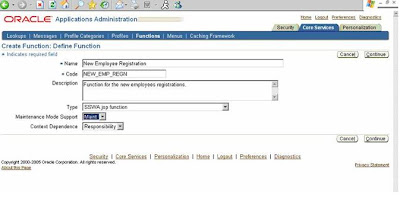
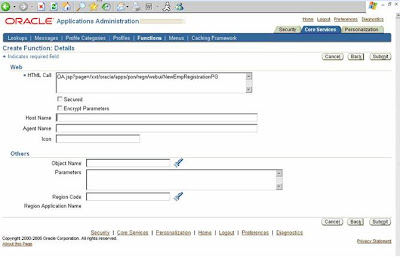
After the function creation we have to add this function to a menu and the menu has to be granted to GUEST user.
2.3 Add the function to a new menu
Use fuctional administrator responsibility to create a new Menu. Add the created function with this new menu.
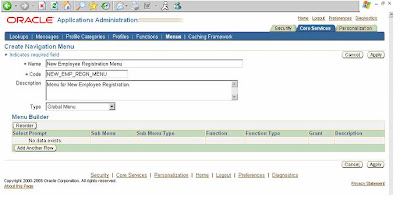

Now we are ready with the menu that is having a function, which points to a page which we want to access without the user log in.
If you want to give access to more than one page you can add, as many functions to the menu, like below.
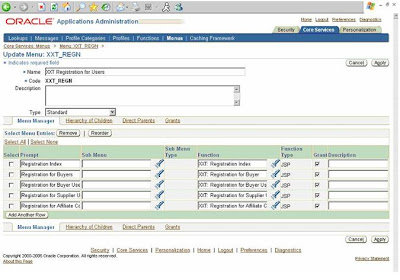
2.4 Create Grant for the created menu.
To create Grant for the menu we have created now, use Security Tab in the functional administrator responsibility. Follow the below mentioned steps.
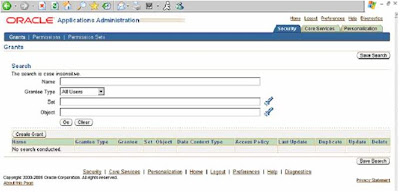
Step I: Log on to Application with Functional Administrator Responsibility and click on functional administrator responsibility. Click on “Create Grant” button (To create a Global Grant)
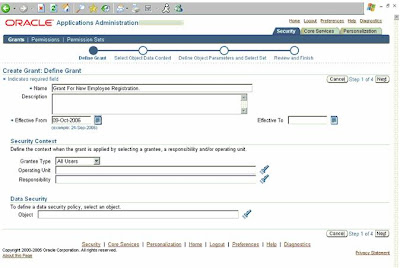
Step II: Enter the Grant Name and select Grantee Type as “All Users” and click “Next”
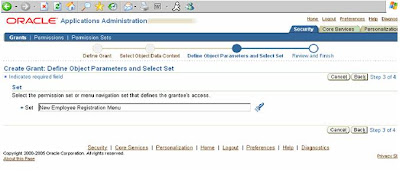
Step III: Enter the User Menu Name of the newly created Menu and click “Next”
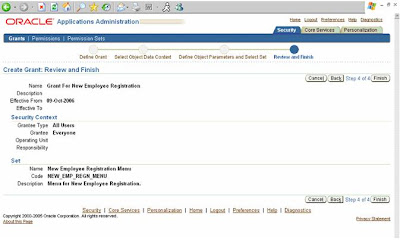
Step IV : Click “Finish” button
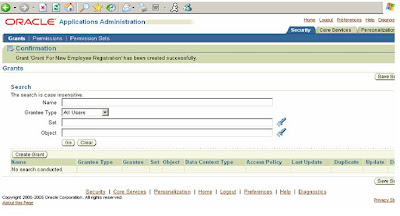
Step V: Again click on “Create Grant” (To create Guest Grant)
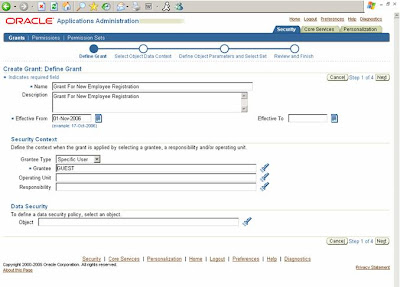
Step VI : Enter the Grant Name and select Grantee Type as “Specific User”. The page refreshes to display a new field called “Grantee” (If the page fails to refresh click “Next” button to go to the next screen and click “Back” button on the next screen to come back to this screen)
Enter “GUEST” in the “Grantee” field and click “Next”
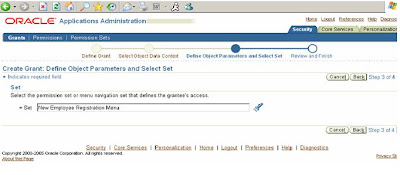
Step VII: Enter the User Menu Name of the newly created Menu and click “Next”
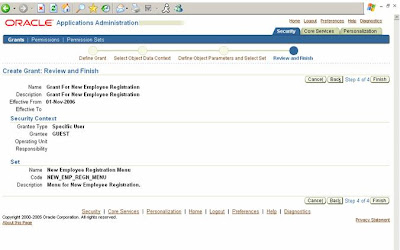
Step VIII : Click “Finish” button
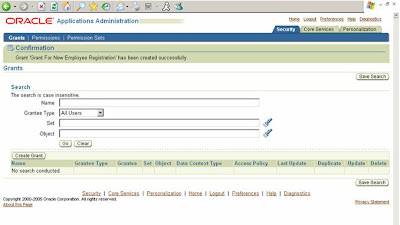
Step IX: Grant creations successfully completed.
3 Download and Upload the Grant
Following command used to download the created Grant.
FNDLOAD apps/apps 0 Y DOWNLOAD $FND_TOP/patch/115/import/afsload.lct XXTGUESTGRT_US.ldt GRANT GNT_MENU_NAME= NEW_EMP_REGN_MENU
To upload this grant into a new instance upload the page and the menu as usual and upload the Grant for the menu using the following command.
Following command used to upload the downloaded Grant.
FNDLOAD apps/apps 0 Y UPLOAD $FND_TOP/patch/115/import/afsload.lct XXTGUESTGRT_US.ldt
No we can access the newly created page without login into the applications using the following URL.
http://: /OA_HTML/OA.jsp?OAFunc=NEW_EMP_REGN
This document explains the OAFramework (ver 5.7 H for Apps 11.5.9 and 5.10 for Apps 11.5.10) Anonymous User page (like registration page) development and deployment in an instance and pack for the other instances.
This document assumes that the reader has a basic knowledge of OA Frmework page creation and deployment.
1.2 Background
This document should be used for creating Guest User pages and all type of registration pages. When this document fails to cover a topic, recommendations from OA Framework Development Team should be followed. If you have a Guest user page to display that does not require a user to log in.
1.3 Related Documents
1. OA Framework Developers’ Guide
2 Creation Of the Anonymous page
2.1 New page with anonymous user setup.
To create a page with anonymous setup we should have a standard OAFramework page with all the components required for the page.
We have to create the function for this page.
Let us consider a Registration page NewEmpRegistrationPG.xml and the registered function for this page is NEW_EMP_REGN.
We have to change the following properties for the MainRN for the page.
Rendered: ${oa.FunctionSecurity. NEW_EMP_REGN}
Security Mode: selfSecured

Use the following command to upload the page to the instance,
java oracle.jrad.tools.xml.importer.XMLImporter
Example.
java oracle.jrad.tools.xml.importer.XMLImporter NewEmpRegistrationPG.xml -username apps -password apps -dbconnection "(DESCRIPTION=(ADDRESS=(PROTOCOL=tcp)(HOST=I3SN021E.idc.oracle.com)(PORT=1610))(CONNECT_DATA=(SID=scmtrng)))" -rootdir ./ -rootPackage /xxt/oracle/apps/pon/registration/webui
2.2 Create a function for the new page
Use functional administrator (Self Service) or using system administrator (Forms) responsibility and create a function for the uploaded page.


After the function creation we have to add this function to a menu and the menu has to be granted to GUEST user.
2.3 Add the function to a new menu
Use fuctional administrator responsibility to create a new Menu. Add the created function with this new menu.


Now we are ready with the menu that is having a function, which points to a page which we want to access without the user log in.
If you want to give access to more than one page you can add, as many functions to the menu, like below.

2.4 Create Grant for the created menu.
To create Grant for the menu we have created now, use Security Tab in the functional administrator responsibility. Follow the below mentioned steps.

Step I: Log on to Application with Functional Administrator Responsibility and click on functional administrator responsibility. Click on “Create Grant” button (To create a Global Grant)

Step II: Enter the Grant Name and select Grantee Type as “All Users” and click “Next”

Step III: Enter the User Menu Name of the newly created Menu and click “Next”

Step IV : Click “Finish” button

Step V: Again click on “Create Grant” (To create Guest Grant)

Step VI : Enter the Grant Name and select Grantee Type as “Specific User”. The page refreshes to display a new field called “Grantee” (If the page fails to refresh click “Next” button to go to the next screen and click “Back” button on the next screen to come back to this screen)
Enter “GUEST” in the “Grantee” field and click “Next”

Step VII: Enter the User Menu Name of the newly created Menu and click “Next”

Step VIII : Click “Finish” button

Step IX: Grant creations successfully completed.
3 Download and Upload the Grant
Following command used to download the created Grant.
FNDLOAD apps/apps 0 Y DOWNLOAD $FND_TOP/patch/115/import/afsload.lct XXTGUESTGRT_US.ldt GRANT GNT_MENU_NAME= NEW_EMP_REGN_MENU
To upload this grant into a new instance upload the page and the menu as usual and upload the Grant for the menu using the following command.
Following command used to upload the downloaded Grant.
FNDLOAD apps/apps 0 Y UPLOAD $FND_TOP/patch/115/import/afsload.lct XXTGUESTGRT_US.ldt
No we can access the newly created page without login into the applications using the following URL.
http://
Tuesday, July 1, 2008
Disable Browser Back Button in OAF
Hi all,
These days I am so muh busy with SOA, ADF and Bpel projects that I do not get time to write articles. But recently helped a friend in old team for fixing browser back button in one of his OAF transaction pages which was creating error in his page.
Basically a small trick used in various J2EE projects in javascript helps to sort of nullify the browser back button in oaf page. This is what you need to do,
Put following code in process request of OAF page :
OABodyBean bodyBean = (OABodyBean) OAPageContext.getRootWebBean();
String javaS = “javascript:window.history.forward(1);”;
bodyBean.setOnLoad(javaS);
Actually window.history.forward(1) would push the current page ahead in the "visited pages history". A negative number like -1 would restore the previous visited page from browser's cache. Zero is relative to the current (displayed) page. Positive numbers would navigate forward.
If the page number (positive) does not exist in history, your browser will create an entry "copying" the current page to it and setting it as the current entry, so that the previous and actual are the same.
Using window.history.forward(1) does not disable "Back button". The button will work BUT as this script runs on page loading, it will send you "ahead" the history, which stored URL (or page) is the same. So it works like a "Refresh" button, without actually refreshing content from server, but just restoring from cache.
Hope this helps all.
Wednesday, May 14, 2008
Some facts About R12 OAF techstack
As Applications R12 is maturing and stabilising , we are seeing more and more R12 projects coming up. One prominent question I find very often on Oracle OAF forums as well as e mails, is there any change is relation of OA Framework components development and deployment in R12?? Here is list of some changes which you will come across while working on any R12 project:
1)Apache Jserv is upgraded to OC4J(Oracle Containers for Java) server in R12.
2)How to enable log in R12?Since there is no Jserv as in 11i, there is no more dependency on jserv.properties file for enabling of log.Here are the details how to enable log on R12:
In R12,
Goto $ORA_CONFIG_HOME/10.1.3/opmn/conf
take the backup of opmn.xml
edit opmn.xml for data id="java-options" and add the following:
-DAFLOG_ENABLED=true -DAFLOG_LEVEL=statement
-DAFLOG_MODULE=fnd%
-DAFLOG_FILENAME=/tmp/aflog.txt -Djbo.debugoutput=console
The log message should get written in,
$INST_TOP/logs/ora/10.1.3/opmn/oacore_default_group_1/oacorestd.out
3)How to add custom classpath in OC4J server classpath ?
Add an entry in,
$ORA_CONFIG_HOME/10.1.3/j2ee/oacore/application-deployments/oacore/orion-application.xml
< library path="..."/ >
prepending the existing library path.Modifying orion-application.xml works only if you manually go and modify it. But whenever we run autoconfig orion-application.xml is generated again and it does not have the custom jar files which we had specified.
In case you need to permanently add a custom classpath to the OC4J instances then you need to update the template file
$FND_TOP/admin/template/orion_application_xml_1013.tmp
There would be some set of entries with tags like
< library path="%s_oacore_prepend_classpath%" />
< library path="%s_javatop%" />
< library path="%s_af_jlib%/ojdigsig.zip" />
< library path="%s_oacore_append_classpath%" />
< library path="%s_weboh_oh%/j2ee/forms/applications/forms/formsweb/WEB-INF/lib/frmsrv.jar" />
< library path="%s_tools_oh%/forms/java/frmxlate.jar" />
< library path="%s_weboh_oh%/j2ee/oafm/applications/mapviewer/web/WEB-INF/lib/mvclient.jar" />
you can add your custom path like this after all the existing library path entires
where /abc/xyz/classpath.jar is the path for your custom libraries
4)Autocompilation setting of jsp files in R12.
In file
$INST_TOP/ora/10.1.3/j2ee/oacore/application-deployments/oacore/html/orion-web.xml
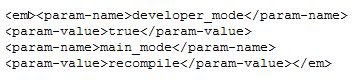
afterwards please restart apache
$ADMIN_SCRIPTS_HOME/adapcctl.sh stopall
$ADMIN_SCRIPTS_HOME/adapcctl.sh startall
now, whenever you change a character in your jsp, this will immediate reflect your output. In production environments this setting is not recommended.
4)Steps for Manual compilation of jsp in R12.
> cd $FND_TOP/patch/115/bin
> ojspCompile.pl --compile -s hello.jsp
5) Why R12 uses two Oracle homes in ?
There is an interesting article on Steven Chan's blog on this which explains y Oracle introduced 10.1.3 and 10.1.2 both in R12 Application server archietecture:
Why Use Two ORACLE_HOMEs for Release 12's Application Tier?
6)DBC file location in R12:
$INST_TOP/appl/fnd/12.0.0/secure
7)Bouncing OC4J server, for OAF to pick latest class and xml files.
In R12, there are two scripts which need to run to bounce the HTTP server and make OC4J container pick latest class files instead of one as in 11i, we only need to run adapcctl.sh shell script to bounce Apache Jserv.
Since in R12 Jserv is replaces by OC4J container, we need to run two scripts:
1)Script which is responsible for bouncing Oracle HTTP Server (powered by Apache).(adapcctl.sh)
2)Script which responsible for bouncing OC4J container (adoacorectl.sh)
So basically, here is the sequence of steps you need to do :
1)adapcctl.sh stop
2)adoacorectl.sh stop
3)adapcctl.sh start
4)adoacorectl.sh start
All these scripts are in $ADMIN_SCRIPTS_HOME
1)Apache Jserv is upgraded to OC4J(Oracle Containers for Java) server in R12.
2)How to enable log in R12?Since there is no Jserv as in 11i, there is no more dependency on jserv.properties file for enabling of log.Here are the details how to enable log on R12:
In R12,
Goto $ORA_CONFIG_HOME/10.1.3/opmn/conf
take the backup of opmn.xml
edit opmn.xml for data id="java-options" and add the following:
-DAFLOG_ENABLED=true -DAFLOG_LEVEL=statement
-DAFLOG_MODULE=fnd%
-DAFLOG_FILENAME=/tmp/aflog.txt -Djbo.debugoutput=console
The log message should get written in,
$INST_TOP/logs/ora/10.1.3/opmn/oacore_default_group_1/oacorestd.out
3)How to add custom classpath in OC4J server classpath ?
Add an entry in,
$ORA_CONFIG_HOME/10.1.3/j2ee/oacore/application-deployments/oacore/orion-application.xml
< library path="..."/ >
prepending the existing library path.Modifying orion-application.xml works only if you manually go and modify it. But whenever we run autoconfig orion-application.xml is generated again and it does not have the custom jar files which we had specified.
In case you need to permanently add a custom classpath to the OC4J instances then you need to update the template file
$FND_TOP/admin/template/orion_application_xml_1013.tmp
There would be some set of entries with tags like
< library path="%s_oacore_prepend_classpath%" />
< library path="%s_javatop%" />
< library path="%s_af_jlib%/ojdigsig.zip" />
< library path="%s_oacore_append_classpath%" />
< library path="%s_weboh_oh%/j2ee/forms/applications/forms/formsweb/WEB-INF/lib/frmsrv.jar" />
< library path="%s_tools_oh%/forms/java/frmxlate.jar" />
< library path="%s_weboh_oh%/j2ee/oafm/applications/mapviewer/web/WEB-INF/lib/mvclient.jar" />
you can add your custom path like this after all the existing library path entires
where /abc/xyz/classpath.jar is the path for your custom libraries
4)Autocompilation setting of jsp files in R12.
In file
$INST_TOP/ora/10.1.3/j2ee/oacore/application-deployments/oacore/html/orion-web.xml

afterwards please restart apache
$ADMIN_SCRIPTS_HOME/adapcctl.sh stopall
$ADMIN_SCRIPTS_HOME/adapcctl.sh startall
now, whenever you change a character in your jsp, this will immediate reflect your output. In production environments this setting is not recommended.
4)Steps for Manual compilation of jsp in R12.
> cd $FND_TOP/patch/115/bin
> ojspCompile.pl --compile -s hello.jsp
5) Why R12 uses two Oracle homes in ?
There is an interesting article on Steven Chan's blog on this which explains y Oracle introduced 10.1.3 and 10.1.2 both in R12 Application server archietecture:
Why Use Two ORACLE_HOMEs for Release 12's Application Tier?
6)DBC file location in R12:
$INST_TOP/appl/fnd/12.0.0/secure
7)Bouncing OC4J server, for OAF to pick latest class and xml files.
In R12, there are two scripts which need to run to bounce the HTTP server and make OC4J container pick latest class files instead of one as in 11i, we only need to run adapcctl.sh shell script to bounce Apache Jserv.
Since in R12 Jserv is replaces by OC4J container, we need to run two scripts:
1)Script which is responsible for bouncing Oracle HTTP Server (powered by Apache).(adapcctl.sh)
2)Script which responsible for bouncing OC4J container (adoacorectl.sh)
So basically, here is the sequence of steps you need to do :
1)adapcctl.sh stop
2)adoacorectl.sh stop
3)adapcctl.sh start
4)adoacorectl.sh start
All these scripts are in $ADMIN_SCRIPTS_HOME
Subscribe to:
Posts (Atom)