Thursday, May 5, 2022

Setup X11 forwarding on Oracle OCI (or Oracle JCS VM) - Oracle Linux 7

In general, there are a variety of tools, that can be selected for using X11 forwarding from a Linux machine, in this article I am using MobaXterm, as this tool have some very good features on top of a standard putty and related utilities.

 Connect to OCI VM via MobaXterm, most likely you will see X11 forwarding disabled by default.

Steps to be taken to make sure X11 forwarding is enabled on the  OCI VM :

  1. Log into the VM and sudo -s root, if you are not root.
  2. Configure SSHD to not to check if X11 forwarding is enabled:
    1. cd /etc/ssh
    2. vi sshd_config
    3. Check if the property X11Forwarding is set to yes.
    4. Add AddressFamily inet in the list


    5. Save the file
    6. Restart the ssh daemon by executing: systemctl restart sshd
  3. Install xauth by executing: yum -y install xauth
  4. Install xterm (used to verify X configuration) by executing yum -y install xterm
  5. Also install xclock for simple testing of the X Forwarding: yum -y install xclock

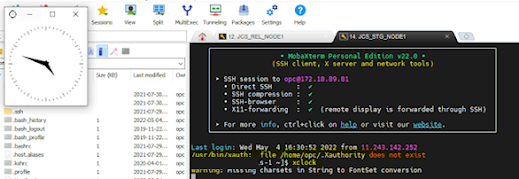
 Once the above activities are completed close the session and open a new session in MobaXterm, this time you should see xauth error by default as the folder doesn't exists, you can ignore that and run xclock(It is automatically created behind the scenes).


 But what if I want to run x11 forwarding as oracle user? Lets’ see what happens


Now, we focus on second problem:  the reason for  not setting DISPLAY , because display was only set for the original user which was used to connect session with MobaXterm. Do, these steps in order to set X11 forwarding for any user you switched after connecting to MobaXterm initially :

1.     Connect with default user, say opc.

2.     Type xclock , to check if display is working fine for the opc user.

3.      Type echo $DISPLAY


4.     Type xauth list $DISPLAY


5.      Now, switch to a different user , say oracle sudo su – oracle

6.      Upload export variable: export DISPLAY=localhost:11.0

7.     Add the cookie session reference to current user:

xauth add <output of step #4>

xauth add xxxx-wls-1/unix:10  MIT-MAGIC-COOKIE-1  dd413b3fb2aea0e4cd60f504c2893fcf

            and that’s it after this you will be able to run xclock.

Getting back to Blogging on OCI and HCM

 I took a break from blogging after I moved to US back in 2012  , I guess life had had a lot of other things to keep me busy on my journey of technical learning and  a lot of video gaming :) . Over last couple of years have worked extensively on different Oracle OCI cloud(s) like ATP, JCS, DBCS, OIC etc. along with Hcm.  So, starting back on blogging on  issues that touch everyday of our lives on Oracle PaaS and SaaS.

Friday, May 24, 2013

New page template for custom webcenter project : Not able to add as portal resource

I recently faced a strange issue while creating a new template for webcenter project in Jdeveloper. I created a custom page template for my portal application based on a quick start layout and added some custom code that displays content for header and footer region . Now when I tried to add this page template as a new page template in resource catalog by right clicking the PageTemplate.jspx and selecting create as portal resource. It gives me notification, that "the jspx document is not a valid page template or content presenter template. Recognizing the resource type as Page Style".

In <af:xmlContent> tag you should add:

<facet>
<description>Facet for content</description>
<facet-name>content</facet-name>
</facet>
And in some parte of your code you need add this:
<af:facetRef facetName="content"/>


After this change if you will try to add the template in resource catalog,it should work fine.Hope this helps.

Friday, April 19, 2013

ADF 11g Skinning

An excellent article by Frank on how to approach skinning in ADF , helps to understand how to approach skinning in ADF. Also with latest release of Jdeveloper you have a skin designer as part of Jdeveloper itself , which makes skinning a lot easier.Here is the link to the article : http://download.oracle.com/otn_hosted_doc/jdeveloper/11gdemos/adf-insider-skinning/adf-insider-skinning.html . 

ADF 11g .... now Free !

I was not aware that Oracle has now made ADF free, that is a great news for entire J2EE community, now you can quickly develop rich web applications on ADF 11g and deploy on any open source free server like Glassfish, etc. Here is the link for the declaration : http://www.oracle.com/us/corporate/press/1851249

Tuesday, April 16, 2013

Webcentre Discussions Dissection


Hi All , after sleeping for quite some time, thought to start blogging back. This  time I thought to start with ADF/Webcentre. Webcentre , as we all are seeing is gaining quite a momentum in consulting market now and I can see numerous projects being done some standard spaces implementation , but most projects are custom Webcentre portal as its gives you the liquidity to build any to integrate or build standard ADF application and use lot many features of Webcentre.

An essential part of Webcentre is Webcentre Discussions(Jive Forums) server and its service. Recently I worked on a custom webcentre project where I integrated the discussion service of webcentre. My idea of writing this article is to explain the discussion service terminology and  details and then programmatic API(s) which might help you to do something creative in your project with discussion service.


About Jive Forums
Jive forums is the software which runs on discussion server and is a self sufficient forums portal/website. In fact Oracle forums are built on the same platform. Its quite stable, robust and fast.There are currently two editions of Jive Forums: Silver Edition (for small to midsize deployments) and Gold Edition (for large deployments). Some Features unique to the Gold edition include:

• Question/answer workflow, through which users can mark a post as a question then designate
responses as helpful or correct (scoring points for the users who posted them).
• Expert email notification, in which email notifications are sent for unanswered questions.
• Multiple theme configurations to customize look and feel.
• Reward point system, where points are awarded for responses based on how useful the response
turns out to be.
• Community everywhere, through which users embed discussion threads into other web pages.
• Web services for programmatic access to Jive Forums data.


Discussion Forums basics
a) Community : A community typically corresponds to a group of people with a common set of interests and it usually has a single overall purpose.
b) Category : A category is the broadest classification of content in a community. Categories may contain other categories, forums, threads, and messages.
c)Forum: A forum generally focuses on a single thread or a small group of associated threads, and is narrower in scope than a category.
d)Thread : Threads are the individual questions or subjects discussed within the scope of a single forum.A thread is defined as an original message and all of its replies. Threads may run only a few messageslong, or may include hundreds of messages.
e)Message : A message refers to a single question, discussion point or reply that is posted to a forum.Messages comprise a subject header, a message body, and sometimes a file attachment or attachments.

Discussion Forums database details
Sometimes, its essential to look into the database of discussion forums, for a requirement like grooup update of something. For this reason, it is absolutely necessary for you to have the understanding of some of the main tables, used in Forums are :

Category : select * from jivecategory where name like ('')

Forums: select * from jiveForum where categoryid=<category id which you can get from jivecategory>

Thread :  Thread is created in the forum where root message id is the starting message of the thread.
select * from jivethread where forumid=92 order by modificationdate desc
You can get root messageid and thread id from the above query. Root message id is the starting message of the thread.

Message : All messages of a thread are stored in the table jivemessage with parent child relationship also maintaining the sequence of replies.If parentmessageid is null then root message, else child message.

select * from jivemessage where forumid= and threadid= and messageid=

--the direct child of this message can be found by quering with parent
--message id as message id
select * from jivemessage where forumid= and threadid= and parentmessageid=

-- using connect by prior getting entire message stack of a thread
--starting from root node
SELECT LEVEL,jv.*
      FROM jivemessage jv
      where jv.forumid= and jv.threadid=
      START WITH jv.messageid =
      CONNECT BY PRIOR jv.messageid = jv.parentmessageid
      ORDER by creationdate
   
-- Pls note that each message 's user id
-- is jive user id which is based on LDAP username configured in weblogic security realm
-- and the relationship is stored in jiveuser table  
SELECT * FROM JIVEUSER

Webcentre Discussion Services Available Taskflows:
With the discussion services, you have the following taskflows:

  1. Discussion Forums: Taskflow that integrates the basic functionality to allow discussions on a page
  2. Discussions - Popular topics: Taskflow that shows the popular topics
  3. Discussions - Quick view: A smaller view to list the topics
  4. Discussions - Recent topics: Taskflow that shows a list of the recent topics
  5. Discussions - Watched topics: Taskflow that shows the list of the watched topics from the current user
  6. Discussions - Watched forums: Taskflow that shows the list of the watched forums from the current user


Webcenter Discussion Forum Programmatic APIs:
Sometimes, you might get a requirement, where you  have requirement to play with code on creating category/discussions/forums. programatically, so giving common APIs used for the same:

Common code for all:

import oracle.webcenter.collab.announcement.AnnouncementFilter;
import oracle.webcenter.collab.announcement.AnnouncementService;
import oracle.webcenter.collab.announcement.AnnouncementSession;
import oracle.webcenter.collab.forum.Category;
import oracle.webcenter.collab.forum.CategoryService;
import oracle.webcenter.collab.forum.Forum;
import oracle.webcenter.collab.forum.ForumService;
import oracle.webcenter.collab.forum.ForumSession;
import oracle.webcenter.collab.forum.MyDiscussionsService;


public ForumSession session = null;
public CategoryService catService = null;
public ForumService forumService = null;


Category
catService = (CategoryService)session.getService(CategoryService.class);
Category newCreatedCategory = catService.createCategory(null, new Long(parentCategoryId).toString(),categoryName, categoryName, categoryName);
categoryId = Long.parseLong(newCreatedCategory.getId());

catService = (CategoryService)session.getService(CategoryService.class);
long rootCategoryId = Long.parseLong(catService.getRootCategoryId());


Forum
List forums = catService.getForums(new Long(categoryId).toString(), null,true);
forumService = (ForumService)session.getService(ForumService.class);
Forum newCreatedForum = forumService.createForum(null,new Long(RootCategoryId).toString(),TopicName, TopicName, TopicName);
forumId = Long.parseLong(newCreatedForum.getId());
Forum forum = forumService.getForum(new Long(forumId).toString());
long topicCount = forum.getTopicCount();


I hope this article gives you a clear picture of discussion forums service in webcentre.

Saturday, July 7, 2012

Proxy or DataControl with webservices in ADF

A recent article by Frank in Oracle Magzine issue July/August 2012 , provides a clear insight and guidelines, about which approach one should take while interacting with web services in an ADF application :
Frank's Article.


Tuesday, June 19, 2012

ExecuteWithParams in ADF 11g

A small post after a long time regarding "ExecuteWithParams"  operation with VO. Most of the time, since coming from OAF background I usually write small methods in AM implementation class and expose it to view controller layer using interface and then drag and drop it as a binding layer in my ADF page.

 But recently was struck, when tried to ease my work using ExecuteWithParams drag and drop directly and assign the bind variable value from pageFlowScope.I worked for almost 4 hours tried all sorts of debugging but everytime when my bounded taskflow reaches executewithparams activity , i use to get error code like :
JBO 27122 error and the exception message like "Missing IN or OUT parameter at index:: 1 " error.

Generally happens with me :) , whenever try to ease my work , some innovative error  comes in... ! But anyways after a careful review of the VO xml files and comparing with old code where I have used this operation many times I came to the conclusion : There are two kinds of bind variables: "where" and "viewcriteria". While editing my viewobjects I accidentally created a variable of the kind "viewcriteria", which means that it cannot be used in the where clause of the sqlquery, but only in a viewcriteria. When you create a "where" variable, you are allowed to use it in the where clause of your query.This all makes sense, but the GUI for editing the variables does NOT show the difference.

So if you run into the error above, look inside the XML of your viewobject for your variable and if you see Kind="viewcriteria", then change it to Kind="where" and try again and  your code should work fine.

Monday, April 23, 2012

Weblogic Vs Jdeveloper 11g

An interesting post on Timo Hohn's blog ,  which helps to avoid different version(s) of ADF Jdeveloper and Weblogic server :

http://tompeez.wordpress.com/2011/09/14/jdeveloper-versions-vs-weblogic-server-versions/

Tuesday, July 6, 2010

JDBC Connections leakage and optimization in Oracle Apps R12.

Identifying issues with JDBC connections in Apps can sometimes be a frustrating process, as the investigations may need to consider multiple failure points and complex architectures. I hope this article will give you a better understanding of JDBC Pooling and where to start looking for issues. Hopefully this article should help system and technical architects in Apps to resolve connection leak problems.

Recently while working with Oracle MEA in world's first major implementation of CMRO module in Apps, we faced some critical performance issues, initially. One of the major performance issue was "JDBC connections leakage". Over a period the "INACTIVE" jdbc connections rise and finally they cross the maximum jdbc connections figure set in database and server goes down. The immediate solution was bouncing OC4J Core and HTTP containers of Oracle Apps application server 10g, but off-course this is something you can not do daily in a production environment.

Since our implementation layer has a strong layer of custom code and standard code , done by various teams and you don't have control on coding of individual new developers. I thought it is next to impossible to identify root cause and fix it ,but thanks to Oracle... in Apps there are some standard ways to fix this problem.

Ok to start with lets start with some basic definitions and facts to understand the problem , I am talking about here :


What is JDBC ?
The Java Database Connectivity (JDBC) API is the industry standard for database-independent connectivity between the Java programming language and a wide range of databases – SQL databases(Oracle,mysql etc) and other tabular data sources, such as spreadsheets or flat files. The JDBC API provides a call-level API for SQL-based database access.

What is JDBC Connection ?
Java JDBC APIs uses connection (session) instance in which SQL statements are executed and results are returned within the context of a connection.

What is JDBC Connection pool?
If you have used a SQL or other similar tool to connect to a database and act on the data, you probably know that getting the connection and logging in is the part that takes the most time. An application can easily spend several seconds every time it needs to establish a connection.

In releases prior to JDBC 2.0 every database session requires a new connection and login even if the previous connection and login used the same table and user account. If you are using a JDBC release prior to 2.0 and want to improve performance, you can cache JDBC connections instead.

Cached connections are kept in a runtime object pool and can be used and reused as needed by the application. One way to implement the object pool is to make a simple hashtable of connection objects.

What is Connection leakage ?
An application(basically application server) is said to be leaking connection, if it acquires a connection and does not close it within specified time period. If this feature is enabled, the application server detects these potential connection leaks and dumps the leak tracing logs to server logs. Looking at the logs the user can figure out which application is leaking connection and fix the issues with application, if exists.

What is Connection locks ?
If your are doing multiple DML jdbc transactions in your code with autocommit flag as false on the connection object,the jdbc connection remains locked till the time commit is issued specifically.(By default in OAF/JTF the autocommit flag is false.)


How to identify that Apps instance has connection leakage problem ?

You can run the following sql statement occasionaly to monitor jdbc connections
behaviour :

select s.machine, s.username, s.module, s.inst_id, count(*) how_many
from (select distinct PROGRAM, PADDR, machine, username, module, inst_id from gV$SESSION) s,
gv$process p
where s.paddr = p.addr
and p.inst_id = s.inst_id
group by s.machine,s.username, s.module, s.inst_id


This will list down number of jdbc connections in each module. For OAF, the module is shown as page AM and for JTF/JTT/JSP, the JDBC connections are listed in "JDBC Thin Client". You can keep of track of connections in each module mainly ("JDBC Thin Client"), if this is growing each day. You can also check the status of these connections in v$session if its "INACTIVE" and these connections are persisting for more than 24-48 hours, means these sum up to connection leakage.

For OA Framework calls AOL/J when it needs a database connection, and it is up to OAF to release any such connection when it has finished with it. There is an added complexity, in that OAF also has its own pooling mechanism for the OAF Pages, which is the "Application Module pool" (AM pool). This means that although a user may have finished with a page, the page and its associated database connection are retained for a period of time.So, generally this layer would not have problem, because developer does not have to release/close connection in his code, that is automatically taken care by framework depending upon AM instance pooling and Database Connection Pooling enabled on the instance.

AOL/J JDBC code is the code that handles JDBC connection, it is often the first area to be blamed, but the JDBC connection pool can only drop database connections where the calling application has released the JDBC connection it holds in the pool, so it often turns out to be an issue higher up the code stack.This layer covers all yours JSP/JTT/JTF layer and 99% of the cases is responsible for connections leaks.

How to track leaked and locked connections?
Once you see that your instance has a problem of growing jdbc connections over a period of time all with inactive status for more than 24-48 hours, you will now start to debug and find the exact leaked and locked connections.To gather JDBC Connection statics , do following steps :
1) We need to first identify number of OACORE processes running on apps application server, then on each OACORE process we will check number of leaked locked jdbc connections in Apps instance.To note the number of OACORE processes , we need to do following in Unix box of each application server node :

(i) Login to Apps Application server unix box using ftp tool like putty.
(ii) cd $ADMIN_SCRIPTS_HOME
(iii) adoacorectl.sh status

The output will look like :

Processes in Instance:
---------------------------------+--------------------+---------+---------
ias-component | process-type | pid | status
---------------------------------+--------------------+---------+---------
OC4JGroup:default_group | OC4J:oafm | 21894 | Alive
OC4JGroup:default_group | OC4J:forms | 21861 | Alive
OC4JGroup:default_group | OC4J:oacore | 21775 | Alive
OC4JGroup:default_group | OC4J:oacore | 21776 | Alive
HTTP_Server | HTTP_Server | 21699 | Alive

From this we can analyse that there are two OCCore processes running with process id
21775 and 21776 .

Please note in case of multi-node enviorment i.e. Application server with multiple nodes,you will have to run this command individually on each node to get the OACORE process id(s) for that node.

2) Enable FND Diagnostics profile at your user level.

3) Login into Apps instance, on home page click "About This Page" link.

4)Go to subtab "Java System Properties" and note "CLIENT_PROCESSID" from the
table, this will be one of what you got in step 1.

5) Now in the url type : http://< host >:< port >/OA_HTML/jsp/fnd/AoljDbcPoolStatus.jsp

6) This will display you the list of leaked and locked connections for the process id you got in step 3. For leaked connections if you will click the hyperlink, you will also get detailed stack for each leaked connection , which can furthur help you
in identifying the code layer where connection leak is happening.


You need to repeat step (3) and (4) again and again each time logging out and closing the browser to track all the CLIENT_PROCESSID locked and leaked connections.


How to get the root cause/code that is causing this connection leak ?
Actually AoljDbcPoolStatus.jsp is the key to resolve this problem and leaked connection stack will help us to figure out our problem.We can make following conclusions from the stack :

1) The first obvious thing you will want to look at is that whether or not your custom code is causing this problem. Thats easy just search the stack with ur custom top name eg- all your extensions lie in lets say xxabc folder under $JAVA_TOP, then you can search xxabc in leak connection stack, that will give you pointers of class and code where this connection is instantiated and later not released/closed.

2) For custom and standard jsp(s), search the stack with "_" as all jsp classes in apps are compiled as "_" pre-fixed to the jsp name. So this can give you idea where and which jsp are leaking connections. In my experience, this is the layer where most developers make mistakes.

3) Lastly if not custom class then standard classes are doing this (This is a rare case), and for this you anyways just have to raise an SR with Oracle to fix this. To identify search stacks and see its coming from which module i.e., the stack will we like oracle.apps.per.xxx.yyy or oracle.apps.icx.yyy.zzzz , this simple points you that per=> HRMS or ICX=> I-procurement module standard class is causing this problem. Its always good to decompile and look at the code of these classes because often developers do invaisive customization to Oracle code, directly changing the seeded Oracle file to take easy way to their customizations , without realising that this can later cause bigger problems.

Hopefully these analysis will help you to fix root cause of connection leakage problem.

Wednesday, April 7, 2010

Adding programmatic fire Action to UIX beans which dont support it

Recently, a friend had a requirement of a customization in a seeded page where he needs to put some validation on a table column which was actually OAMessageDateFieldBean.

This is quite simple and generic requirement , when he called me ...I told him that since , this has to be done in seeded Oracle page and fire action elements can't be added by personalization,he just needs to extend the CO and attach fire action programatically to the OAMessageDateFieldBean in process request and then can handle his logic of validation in process form request.But the tricky part came when he told me his code is not compiling since setFireActionForSubmit API is absent in OAMessageDateFieldBean class.

I just wondered how is it possible since this bean allows me to configure fireaction decalaratively, then there should be an API of doing it programatically too in the bean. Then I remebered with each UIX bean Oracle also gives a helper class, which can usually be instantiated by using getHelper(), on the bean instance.

Whenever you are in such situations , its worth while to look into bean helper classes. Ok.. so here is the code how you can configure firection on OAMessageDateFieldBean programatically :

//In process request.

//getting table bean instance
OATableBean t=(OATableBean)webBean.findChildRecursive("< table bean id >");

//getting OAMessageDateFieldBean inside
//table bean
OAMessageDateFieldBean expDate = (OAMessageDateFieldBean)t.findChildRecursive("< OAMessageDateFieldBean id >");

//hard-parameters for fire action
//it will help us to identify if action
//has occured or not
Hashtable params = new Hashtable (1);
params.put ("XX_ACTION","XXX");

//bound value parameters for fire action
// basically the primary key attribute of
//VO to get the row from which action has occured
//eg, lets say the VO attribute is Visit id AND
//that is primary key
Hashtable paramsWithBinds = new Hashtable(1);
paramsWithBinds.put ("XX_PRIMARY",new OADataBoundValueFireActionURL((OAWebBeanData) expDate, "{$VisitId}"));

//Most important---
//taking helper class instance
// there we get the API to attach fire action.
expDate.getHelper().setFireActionForSubmit(expDate,"delete",params, paramsWithBinds,false,false);

//In Process form request

if(pageContext.getParameter("XX_ACTION")!=null)
{
//by this primary key we can retrieve the VO row at which
// action occured and utilise the other column data
// for validations.
String primary_key=pageContext.getParameter("XX_PRIMARY");

.......

//finally releasing the parameters from
//current pagecontext requesr
pagecontext.removeParameter("XX_ACTION");
pagecontext.removeParameter("XX_PRIMARY");
}


Alternative : There is a alternate way to attach PPR/Fireaction to any bean.Use static methods in class OAWebBeanUtils, like
OAWebBeanUtils.getFirePartialActionForSubmit()
OAWebBeanUtils.getFireActionForSubmit()
and then use

// finally set it on your bean
bean.setAttributeValue
(PRIMARY_CLIENT_ACTION_ATTR, fireAction);

Happy coding....!

Wednesday, March 17, 2010

Concept of Nested AM.

Hi All,
Writing a theoretical article after a long time. What inspired me to write.... hmm... lot of questioning developers :) . Ok, my target with this article is to make an OA Framework developer understand what is nested AM? and how can u find a nested AM instance from master/root AM instance? What we should know about it while developing extensions or new pages.

What is a Nested AM?
--------------------------------------
An application module may be a root application module or a nested application module. A root application module is not contained in another applicatin module. It provides transaction context for all objects contained in it. It may optionally contain nested application modules. A root application module is created through JNDI calls.

A nested application module is contained in another application module. The containing application module is referred to as the parent application module. If one traverses this containership ancestry, one will eventually find the root application module (which does not have a parent application module). A nested application module uses the transaction context provided by the root application module. Thus, data modifications performed in application modules parented by one root application module will commit or rollback together.

Transaction
-----------------------------
Associated with the root application module is the Transaction object, which provides this transaction context. From any (root or nested) application module, the user can retrieve the transaction object through a call to getOADBTransaction(). In reality, getOADBTransaction() first locates the root application module and then returns the transaction object from it.

The transaction object manages connection to database and entity caches. Thus, changes made through one view object are visible to other view objects as long as these view objects all parented by the one root application module. In contrast, if two view objects are parented by two separate root application modules, then changes made through the view object will not be seen by the second view object until the changes are committed to database through the first root application module and the second VO executes query (to retrieve the most up-to-date data from database).

Creating Application Module
--------------------------------------------------------------------
A root application module is created by:

Finding the application module home through JNDI.
Calling create() on the application module home.
Here is a sample code to create a root application module:

java.util.Hashtable env = new java.util.Hashtable();

// Add environment entries into env...

javax.naming.Context ic = new InitialContext(env);

// 'defName' is the JNDI name for the application module
// definition from which the root application module is to
// be created
String defName = ...;

oracle.jbo.ApplicationModuleHome home = ic.lookup(defName);
oracle.jbo.ApplicationModule am = home.create();


One creates a nested application module by calling createApplicationModule on the parent Application module.

How nested AM concept works in OAF :
---------------------------------------------------------------------------
Now to associate a nested application module with a region,
specify either of the following properties:
1) AM Instance -- The application module instance name as specified in the application module's data
model. For example, PoSummaryAM1.
2) AM Definition -- The fully qualified name of the application module instance. For example,
oracle.apps.fnd.framework.toolbox.tutorial.server.PoSummaryAM.

If you specify the AM Instance property, OA Framework attempts to find and return the AM instance with the given name. It searches the application module associated with the parent web bean.
If you specify the AM Definition property, OA Framework assigns a generated AM instance name to the nested region. This name is comprised of the following values:
a) Region code of the associated nested region (if the region was originally created in AK)
b) Nested region application ID
c) Nested region ID
d) AM definition name.

OA Framework checks to see if the nested AM with the system-generated name has been already created under the application module of the parent web bean. If the instance is not found, OA Framework creates and uses a nested AM with the system-generated name. Otherwise, it reuses the pre-existing AM with the system generated
name.


When specifying both the AM Instance and AM Definition properties
if a matching AM instance is found, OA Framework compares its definition with the AM Definition property value. If there is a mismatch, OA Framework throws an exception.
If a matching AM instance is not found, OA Framework creates and returns a nested application module instance with the given AM instance name and the definition.


Code for finding nested AM instance in root AM :
-----------------------------------------------------------------------------------
Hence, whenever you are trying to find an nested AM instance linked to a OA region under pagelayout region, please check the am defination and am instance property of that region, because only then you would be able to have a idea of name of nested AM instance. It can be system generated AM instance or name given by developer for AM instance.So, you need to confirm this from the three cases mentioned in the previous article.For debugging purposes, you can get the list if Application modules in root AM and print there names ,too :

String[] nestedAMNames = parentAM.getApplicationModuleNames();

// If you want to retrieve all currently loaded nested Application Modules
ApplicationModule[] nestedAMs = new ApplicationModule[nestedAMNames.length];

for (int i = 0; i < nestedAMNames.length; i++)
{
nestedAM[i] = parentAM.findApplicationModule(nestedAMNames[i]);
}


Otherwise for finding nested AM instance by :
ApplicationModule nestedAM = parentAM.findApplicationModule("MyNestedAM");

This concept is really helpful while doing extensions in OAF, as you may have to find a nested AM in a CO of particular OAF region.You can always find root AM of the page in any controller using pagecontext.getRootApplicationModule().

I hope after reading this article nested AM conecept becomes crystal clear in your mind :), if not raise queries, and I will try to answer you.

Wednesday, February 3, 2010

Attaching AutoSubmit Property to a OA page.

Hi All,
I recently received couple of mails where people more or less have the requirement like :
1) Data of the page gets refresh every 10 sec automatically.
2) Data of the page should be autosaved every 10 seconds etc.

This is very similar to autosave feature of microsoft word or popular email websites like yahoo and google. A small javascript function can do this for you.Here are the steps how, you can achieve this functionality in an OAF page :

/**
* @param pageContext -current page context in CO
* @param evt_name - javascript event will be registered with this name.
* @param time_in_milli_sec - time in milli sec after which page will refresh
* e.g if you wanna submit page every 10 sec , enter 10000
* This api should be used in process request and not process form request.
*/
public void attachAutoSubmitPropertyToPage(OAPageContext pageContext,
String evt_name,
String time_in_milli_sec)
{
OABodyBean bodyBean = (OABodyBean) pageContext.getRootWebBean();
String javaS =
"javascript:setTimeout(\"submitForm('DefaultFormName',0,{'" +
evt_name + "':'Y'});\"," + time_in_milli_sec + ");";
bodyBean.setOnLoad(javaS);
}

/**
* @param pageContext -current page context in CO
* @param event_name - pass javascript event name that you registered
* in process request.
* @return return true/false accordinging whether the event has occured or not.
* This api call should be there in process form request.
*/
public boolean isAutoSubmitEvent(OAPageContext pageContext,
String event_name)
{
boolean b = false;
String s =
pageContext.getRenderingContext().getServletRequest().getParameter(event_name);
if (!((s == null) || ("".equals(s.trim()))))
{
if("Y".equals(s))
{
b = true;
pageContext.removeParameter(event_name);
}
}
return b;
}

Then , in process request add the api call

public void processRequest(OAPageContext pageContext, OAWebBean webBean)
{
super.processRequest(pageContext, webBean);
// see javadocs for parameter description
//10000 for 10 sec as we are paaing in millsec
attachAutoSubmitPropertyToPage(pageContext,"XX_EVT","10000");

.
.
.
}


In process form request... you can catch this event in every 10 sec:
public void processFormRequest(OAPageContext pageContext,
OAWebBean webBean)
{
super.processFormRequest(pageContext, webBean);
.
.

if(isAutoSubmitEvent(pageContext,"XX_EVT"))
{
// YOUR LOGIC TO SAVE THE PAGE CONTENTS.
//or to refresh the data... etc
}

I hope this is interesting and will help developers of such kind of requirement.
Happy Coding..!

Tuesday, January 12, 2010

Upload file to Application server using OAFileUploadBean instead of Database

Sometimes, there can be requirement , where you need to upload a file on unix server, instead of database.You can use OAMessageFileUploadBean for this. Add the upload bean in your OAF UIX page. Add an additional submit button bean which will be responsible for file Upload.
On click on this button in process form request call the following method with parameters as described in CO. So, copy this method in CO and then call it in process form request on this submit button click like

uploadFileToServer(pageContext, "item3",
"/xx/app/sss/x");


Here is the method for upload:
/**
* @param pageContext is current pagecontext in CO
* @param fileuploadBeanId is item id of file upload bean
* @param server_dir_path is abslute path on unix server
* where file needs to be written.eg "/xx/xxx/xxx"
*/
public void uploadFileToServer(OAPageContext pageContext,
String fileuploadBeanId,
String server_dir_path)
{
DataObject fileUploadData =
(DataObject) pageContext.getNamedDataObject(fileuploadBeanId);
if(fileUploadData!=null)
{
String uFileName =
(String) fileUploadData.selectValue(null, "UPLOAD_FILE_NAME");
String contentType =
(String) fileUploadData.selectValue(null, "UPLOAD_FILE_MIME_TYPE");

File file = new File(server_dir_path, uFileName);
FileOutputStream output = null;
InputStream input = null;
try
{
output = new FileOutputStream(file);
BlobDomain uploadedByteStream =
(BlobDomain) fileUploadData.selectValue(null, uFileName);
input = uploadedByteStream.getInputStream();
for (int bytes = 0; bytes < uploadedByteStream.getLength(); bytes++)
{
output.write(input.read());
}
}
catch (Exception e)
{
e.printStackTrace();
}
finally
{
try
{
if (input != null)
{
input.close();
}
if (output != null)
{
output.close();
output.flush();
}
}
catch (Exception ez)
{
ez.printStackTrace();
}
}

}
}

Please understand when you run a page from jdeveloper, you are running page on local oc4j server of jdeveloper and not the actual application server of Oracle Apps, hence if this code is run from jdeveloper then you need to give path of your local desktop folder and file will be uploaded in it and not the actual application server.
To test this code actually you should deploy your page onto Oracle apps application server and access the page from a responsibility by registering it as a function , because then it will use Oracle Apps Application Unix server and upload file there.

Happy coding ...!

Tuesday, January 5, 2010

Giving download option to user for a file at a particular location on Application Server

Hi All,
This is a very generic scenario where a user wants to download a particular file from application server. eg- We are storing some report output or some pdf documents in particular location in unix application server. Now in a OAF page on press of a button/link I wanna give user download option for this file.

For this requirement you can use following method, from process form request, u need to pass pagecontext and other parameters as described in method.

//on button click in process form request
//call this method
downloadFileFromServer(
pageContext,--pagecontext
"/xx/xxx/ssss/120devg.pdf",--full file path with file name and ext
"120devg.pdf" --file name with extension
);

Make sure that the folder/files you are giving user option to download through this method, have 777 rights in UNIX server.

Copy these two methods in your CO for the above API to work:
/**
* @param pageContext the current OA page context
* @param file_name_with_path - this is fully qualified file name with its path on unix application
* server. eg "/xxcrp/xxapplcrp/mukul/abc.pdf"
* @param file_name_with_ext - this is file name with extension, you wanna display user
* for download. eg- i wanna display the abc.pdf file download with name five_point_someone.pdf
* then I can pass this as "five_point_someone.pdf"
*/
public void downloadFileFromServer(OAPageContext pageContext,
String file_name_with_path,
String file_name_with_ext)
{
HttpServletResponse response =
(HttpServletResponse) pageContext.getRenderingContext().getServletResponse();
if (((file_name_with_path == null) ||
("".equals(file_name_with_path))))
{
throw new OAException("File path is invalid.");
}

File fileToDownload = null;
try
{
fileToDownload = new File(file_name_with_path);
}
catch (Exception e)
{
throw new OAException("Invalid File Path or file does not exist.");
}

if (!fileToDownload.exists())
{
throw new OAException("File does not exist.");
}

if (!fileToDownload.canRead())
{
throw new OAException("Not Able to read the file.");
}

String fileType = getMimeType(file_name_with_ext);
response.setContentType(fileType);
response.setContentLength((int)fileToDownload.length());
response.setHeader("Content-Disposition",
"attachment; filename=\"" + file_name_with_ext +
"\"");

InputStream in = null;
ServletOutputStream outs = null;

try
{
outs = response.getOutputStream();
in = new BufferedInputStream(new FileInputStream(fileToDownload));
int ch;
while ((ch = in.read()) != -1)
{
outs.write(ch);
}

}
catch (IOException e)
{
// TODO
e.printStackTrace();
}
finally
{
try
{
outs.flush();
outs.close();
if (in != null)
{
in.close();
}
}
catch (Exception e)
{
e.printStackTrace();
}
}
}

/**
* @param s
* @return file mime type from its name
*/
public String getMimeType(String s)
{
int i = s.lastIndexOf(".");
if (i > 0 && i < s.length() - 1)
{
String s1 = s.substring(i + 1);
if (s1.equalsIgnoreCase("amr"))
{
return "audio/amr";
}
if (s1.equalsIgnoreCase("mid"))
{
return "audio/midi";
}
if (s1.equalsIgnoreCase("mmf"))
{
return "application/vnd.smaf";
}
if (s1.equalsIgnoreCase("qcp"))
{
return "audio/vnd.qcelp";
}
if (s1.equalsIgnoreCase("hqx"))
{
return "application/mac-binhex40";
}
if (s1.equalsIgnoreCase("cpt"))
{
return "application/mac-compactpro";
}
if (s1.equalsIgnoreCase("doc"))
{
return "application/msword";
}
if (s1.equalsIgnoreCase("jsp"))
{
return "application/jsp";
}
if (s1.equalsIgnoreCase("oda"))
{
return "application/oda";
}
if (s1.equalsIgnoreCase("pdf"))
{
return "application/pdf";
}
if (s1.equalsIgnoreCase("ai"))
{
return "application/postscript";
}
if (s1.equalsIgnoreCase("eps"))
{
return "application/postscript";
}
if (s1.equalsIgnoreCase("ps"))
{
return "application/postscript";
}
if (s1.equalsIgnoreCase("ppt"))
{
return "application/powerpoint";
}
if (s1.equalsIgnoreCase("rtf"))
{
return "application/rtf";
}
if (s1.equalsIgnoreCase("bcpio"))
{
return "application/x-bcpio";
}
if (s1.equalsIgnoreCase("vcd"))
{
return "application/x-cdlink";
}
if (s1.equalsIgnoreCase("Z"))
{
return "application/x-compress";
}
if (s1.equalsIgnoreCase("cpio"))
{
return "application/x-cpio";
}
if (s1.equalsIgnoreCase("csh"))
{
return "application/x-csh";
}
if (s1.equalsIgnoreCase("dcr"))
{
return "application/x-director";
}
if (s1.equalsIgnoreCase("dir"))
{
return "application/x-director";
}
if (s1.equalsIgnoreCase("dxr"))
{
return "application/x-director";
}
if (s1.equalsIgnoreCase("dvi"))
{
return "application/x-dvi";
}
if (s1.equalsIgnoreCase("gtar"))
{
return "application/x-gtar";
}
if (s1.equalsIgnoreCase("gz"))
{
return "application/x-gzip";
}
if (s1.equalsIgnoreCase("hdf"))
{
return "application/x-hdf";
}
if (s1.equalsIgnoreCase("cgi"))
{
return "application/x-httpd-cgi";
}
if (s1.equalsIgnoreCase("jnlp"))
{
return "application/x-java-jnlp-file";
}
if (s1.equalsIgnoreCase("skp"))
{
return "application/x-koan";
}
if (s1.equalsIgnoreCase("skd"))
{
return "application/x-koan";
}
if (s1.equalsIgnoreCase("skt"))
{
return "application/x-koan";
}
if (s1.equalsIgnoreCase("skm"))
{
return "application/x-koan";
}
if (s1.equalsIgnoreCase("latex"))
{
return "application/x-latex";
}
if (s1.equalsIgnoreCase("mif"))
{
return "application/x-mif";
}
if (s1.equalsIgnoreCase("nc"))
{
return "application/x-netcdf";
}
if (s1.equalsIgnoreCase("cdf"))
{
return "application/x-netcdf";
}
if (s1.equalsIgnoreCase("sh"))
{
return "application/x-sh";
}
if (s1.equalsIgnoreCase("shar"))
{
return "application/x-shar";
}
if (s1.equalsIgnoreCase("sit"))
{
return "application/x-stuffit";
}
if (s1.equalsIgnoreCase("sv4cpio"))
{
return "application/x-sv4cpio";
}
if (s1.equalsIgnoreCase("sv4crc"))
{
return "application/x-sv4crc";
}
if (s1.equalsIgnoreCase("tar"))
{
return "application/x-tar";
}
if (s1.equalsIgnoreCase("tcl"))
{
return "application/x-tcl";
}
if (s1.equalsIgnoreCase("tex"))
{
return "application/x-tex";
}
if (s1.equalsIgnoreCase("textinfo"))
{
return "application/x-texinfo";
}
if (s1.equalsIgnoreCase("texi"))
{
return "application/x-texinfo";
}
if (s1.equalsIgnoreCase("t"))
{
return "application/x-troff";
}
if (s1.equalsIgnoreCase("tr"))
{
return "application/x-troff";
}
if (s1.equalsIgnoreCase("roff"))
{
return "application/x-troff";
}
if (s1.equalsIgnoreCase("man"))
{
return "application/x-troff-man";
}
if (s1.equalsIgnoreCase("me"))
{
return "application/x-troff-me";
}
if (s1.equalsIgnoreCase("ms"))
{
return "application/x-troff-ms";
}
if (s1.equalsIgnoreCase("ustar"))
{
return "application/x-ustar";
}
if (s1.equalsIgnoreCase("src"))
{
return "application/x-wais-source";
}
if (s1.equalsIgnoreCase("xml"))
{
return "text/xml";
}
if (s1.equalsIgnoreCase("ent"))
{
return "text/xml";
}
if (s1.equalsIgnoreCase("cat"))
{
return "text/xml";
}
if (s1.equalsIgnoreCase("sty"))
{
return "text/xml";
}
if (s1.equalsIgnoreCase("dtd"))
{
return "text/dtd";
}
if (s1.equalsIgnoreCase("xsl"))
{
return "text/xsl";
}
if (s1.equalsIgnoreCase("zip"))
{
return "application/zip";
}
if (s1.equalsIgnoreCase("au"))
{
return "audio/basic";
}
if (s1.equalsIgnoreCase("snd"))
{
return "audio/basic";
}
if (s1.equalsIgnoreCase("mpga"))
{
return "audio/mpeg";
}
if (s1.equalsIgnoreCase("mp2"))
{
return "audio/mpeg";
}
if (s1.equalsIgnoreCase("mp3"))
{
return "audio/mpeg";
}
if (s1.equalsIgnoreCase("aif"))
{
return "audio/x-aiff";
}
if (s1.equalsIgnoreCase("aiff"))
{
return "audio/x-aiff";
}
if (s1.equalsIgnoreCase("aifc"))
{
return "audio/x-aiff";
}
if (s1.equalsIgnoreCase("ram"))
{
return "audio/x-pn-realaudio";
}
if (s1.equalsIgnoreCase("rpm"))
{
return "audio/x-pn-realaudio-plugin";
}
if (s1.equalsIgnoreCase("ra"))
{
return "audio/x-realaudio";
}
if (s1.equalsIgnoreCase("wav"))
{
return "audio/x-wav";
}
if (s1.equalsIgnoreCase("pdb"))
{
return "chemical/x-pdb";
}
if (s1.equalsIgnoreCase("xyz"))
{
return "chemical/x-pdb";
}
if (s1.equalsIgnoreCase("gif"))
{
return "image/gif";
}
if (s1.equalsIgnoreCase("ief"))
{
return "image/ief";
}
if (s1.equalsIgnoreCase("jpeg"))
{
return "image/jpeg";
}
if (s1.equalsIgnoreCase("jpg"))
{
return "image/jpeg";
}
if (s1.equalsIgnoreCase("jpe"))
{
return "image/jpeg";
}
if (s1.equalsIgnoreCase("png"))
{
return "image/png";
}
if (s1.equalsIgnoreCase("tiff"))
{
return "image/tiff";
}
if (s1.equalsIgnoreCase("tif"))
{
return "image/tiff";
}
if (s1.equalsIgnoreCase("ras"))
{
return "image/x-cmu-raster";
}
if (s1.equalsIgnoreCase("pnm"))
{
return "image/x-portable-anymap";
}
if (s1.equalsIgnoreCase("pbm"))
{
return "image/x-portable-bitmap";
}
if (s1.equalsIgnoreCase("pgm"))
{
return "image/x-portable-graymap";
}
if (s1.equalsIgnoreCase("ppm"))
{
return "image/x-portable-pixmap";
}
if (s1.equalsIgnoreCase("rgb"))
{
return "image/x-rgb";
}
if (s1.equalsIgnoreCase("xbm"))
{
return "image/x-xbitmap";
}
if (s1.equalsIgnoreCase("xpm"))
{
return "image/x-xpixmap";
}
if (s1.equalsIgnoreCase("xwd"))
{
return "image/x-xwindowdump";
}
if (s1.equalsIgnoreCase("html"))
{
return "text/html";
}
if (s1.equalsIgnoreCase("htm"))
{
return "text/html";
}
if (s1.equalsIgnoreCase("txt"))
{
return "text/plain";
}
if (s1.equalsIgnoreCase("rtx"))
{
return "text/richtext";
}
if (s1.equalsIgnoreCase("tsv"))
{
return "text/tab-separated-values";
}
if (s1.equalsIgnoreCase("etx"))
{
return "text/x-setext";
}
if (s1.equalsIgnoreCase("sgml"))
{
return "text/x-sgml";
}
if (s1.equalsIgnoreCase("sgm"))
{
return "text/x-sgml";
}
if (s1.equalsIgnoreCase("mpeg"))
{
return "video/mpeg";
}
if (s1.equalsIgnoreCase("mpg"))
{
return "video/mpeg";
}
if (s1.equalsIgnoreCase("mpe"))
{
return "video/mpeg";
}
if (s1.equalsIgnoreCase("qt"))
{
return "video/quicktime";
}
if (s1.equalsIgnoreCase("mov"))
{
return "video/quicktime";
}
if (s1.equalsIgnoreCase("avi"))
{
return "video/x-msvideo";
}
if (s1.equalsIgnoreCase("movie"))
{
return "video/x-sgi-movie";
}
if (s1.equalsIgnoreCase("ice"))
{
return "x-conference/x-cooltalk";
}
if (s1.equalsIgnoreCase("wrl"))
{
return "x-world/x-vrml";
}
if (s1.equalsIgnoreCase("vrml"))
{
return "x-world/x-vrml";
}
if (s1.equalsIgnoreCase("wml"))
{
return "text/vnd.wap.wml";
}
if (s1.equalsIgnoreCase("wmlc"))
{
return "application/vnd.wap.wmlc";
}
if (s1.equalsIgnoreCase("wmls"))
{
return "text/vnd.wap.wmlscript";
}
if (s1.equalsIgnoreCase("wmlsc"))
{
return "application/vnd.wap.wmlscriptc";
}
if (s1.equalsIgnoreCase("wbmp"))
{
return "image/vnd.wap.wbmp";
}
if (s1.equalsIgnoreCase("css"))
{
return "text/css";
}
if (s1.equalsIgnoreCase("jad"))
{
return "text/vnd.sun.j2me.app-descriptor";
}
if (s1.equalsIgnoreCase("jar"))
{
return "application/java-archive";
}
if (s1.equalsIgnoreCase("3gp"))
{
return "video/3gp";
}
if (s1.equalsIgnoreCase("3g2"))
{
return "video/3gpp2";
}
if (s1.equalsIgnoreCase("mp4"))
{
return "video/3gpp";
}
}
return "application/octet-stream";
}

Happy coding...! I hope this helps! :)

Implementing Export Button Functionality Programatically

Hi All,
There is often a requirement to export a VO data or a UI table data into a CSV file. OA Framework provides export button bean for the this functionality, which works fine in almost 99% of the cases. But sometimes, you might face a scenario when ur table u have complex UIs like switcher/hide show columns etc, where the standard export functionality doesn't work or you want some columns not to come in export, or you wanna change some data on export.

In such cases, you can implement the export functionality programatically by yourself.Copy paste the following method in the page CO and pass appropriate parameters to get exported data.You can change this method, as per your requirement, to get data/format data or change data.

By default this method will bring all columns of fetch rows of VO instance,although you can use param hidden_attrib_list to pass attributes which you don't want to be included in csv file.You can call this method in the submit button event that you have made in process form request like :

//see api parameter details in the method below.
//array of Vo attr names which need not be written in csv file
String ss[]={xID,xName};
downloadCsvFile(pageContext, "XxAdatVisSearchVO",null, "MAX",ss);

/**
* @param pageContext
* @param view_inst_name is the view object instance name like VO1 etc in root AM.
* Make sure the VO instance name you have passed should be same as in Root AM.
* @param file_name_without_ext - pass for eg for abc.csv , u should pass "abc".If no
* name is passed then by default it will pick "Export.csv".
* @param max_size -pass "MAX", if u want all rows, pass null to get fetch row count
* else pass integer number like 10,20 etc , the number of rows you want to fetch.
* @param hidden_attrib_list -Array of VO attribute names which doesn't need to be shown/written in
* csv file.
*/
public void downloadCsvFile(OAPageContext pageContext,
String view_inst_name,
String file_name_without_ext,
String max_size, String[] hidden_attrib_list)
{
OAViewObject v =
(OAViewObject) pageContext.getRootApplicationModule().findViewObject(view_inst_name);

if (v == null)
{
throw new OAException("Could not find View object instance " +
view_inst_name + " in root AM.");
}
if (v.getFetchedRowCount() == 0)
{
throw new OAException("There is no data to export.");
}
String file_name = "Export";
if (!((file_name_without_ext == null) ||
("".equals(file_name_without_ext))))
{
file_name = file_name_without_ext;
}
HttpServletResponse response =
(HttpServletResponse) pageContext.getRenderingContext().getServletResponse();
response.setContentType("application/text");
response.setHeader("Content-Disposition",
"attachment; filename=" + file_name + ".csv");
PrintWriter pw = null;

try
{
pw = response.getWriter();
int j = 0;
int k = 0;
boolean bb = true;
if ((max_size == null) || ("".equals(max_size)))
{
k = Integer.parseInt(pageContext.getProfile("VO_MAX_FETCH_SIZE"));
bb = false;
}
else if ("MAX".equals(max_size))
{
bb = true;
}
else
{
k = Integer.parseInt(max_size);
bb = false;
}

//Making header
AttributeDef[] a = v.getAttributeDefs();
StringBuffer cc = new StringBuffer();
ArrayList exist_list = new ArrayList();
for (int l = 0; l < a.length; l++)
{
boolean zx = true;
if (hidden_attrib_list != null)
{
for (int z = 0; z < hidden_attrib_list.length; z++)
{
if (a[l].getName().equals(hidden_attrib_list[z]))
{
zx = false;
exist_list.add(String.valueOf(a[l].getIndex()));
}
}
}
if (zx)
{
cc.append("\"" + a[l].getName() + "\"");
cc.append(",");
}
}
String header_row = cc.toString() + "\n";
pw.write(header_row);

for (OAViewRowImpl row = (OAViewRowImpl) v.first(); row != null;
row = (OAViewRowImpl) v.next())
{
j++;
StringBuffer b = new StringBuffer();
for (int i = 0; i < v.getAttributeCount(); i++)
{
boolean cv = true;
for (int u = 0; u < exist_list.size(); u++)
{
if (String.valueOf(i).equals(exist_list.get(u).toString()))
{
cv = false;
}
}

if (cv)
{
Object o = row.getAttribute(i);

if (!(o == null))
{
if (o.getClass().equals(Class.forName("oracle.jbo.domain.Date")))
{
//formatting of date
oracle.jbo.domain.Date dt = (oracle.jbo.domain.Date) o;
java.sql.Date ts = (java.sql.Date) dt.dateValue();
java.text.SimpleDateFormat displayDateFormat =
new java.text.SimpleDateFormat("dd-MMM-yyyy");
String convertedDateString = displayDateFormat.format(ts);
b.append("\"" + convertedDateString + "\"");
}
else
{
b.append("\"" + o.toString() + "\"");
}
}
else
{
b.append("\"\"");
}
b.append(",");
}
}
String final_row = b.toString() + "\n";
pw.write(final_row);
if (!bb)
{
if (j == k)
{
break;
}
}
}
}
catch (Exception e)
{
// TODO
e.printStackTrace();
throw new OAException("Unexpected Exception occured.Exception Details :" +
e.toString());
}
finally
{
pw.flush();
pw.close();
}
}

Happy coding!

Monday, December 28, 2009

Scrolling Table :Table with horizontal Scrollbars and vertical scrollbars

Hi All,
I hope this is quite an interesting reading for most developers and they will try to put this feature in OAF tables.This is a very essential requirement in any of the custom OAF pages, where you show data in OATableBean and table has lot of columns, so, user has to scroll the entire page from scroll bar which is automatically rendered by browser if table width is more than page width.This is very painful for user as everytime, he scrolls the scroll-bar to see extra table columns,entire page is scrolled and he has to scroll back to the page to see other data.Similary, if you are displaying more than 10-20 rows in the table , user needs to scroll the entire page to see all the rendered rows of table.

In order to lessen the pain of the user and to have better UI design, we will render scroll bars both horizontal and vertical just surrounding the table
as , shown in the image below :


So, now lets focus how can we bring these scroll bars. In that case you can use the DIV tag to do the job for you.Put 2 RawText Bean(named DivStart, DivEnd), before and after the Table Bean in the JRAD page as shown in the image below IN JDEVELOPER:


You can use following API in process request :
public void processRequest(OAPageContext pageContext, OAWebBean webBean)
{
super.processRequest(pageContext, webBean);
//SEE ALL PARAMETER values you need to pass in the java comments of the method
addScrollBarsToTable(pageContext, webBean,"DivStart","DivEnd",true,"400",true,"400");
.
.
}


/**
* @param pageContext the current OA page context.
* @param webBean the web bean corresponding to the region.Pass the webBean of pagelayout.
* @param preRawTextBean is name of the Rawtext bean just above the table bean.
* @param postRawTextBean is name of the Rawtext bean just below the table bean.
* @param horizontal_scroll is boolean value if horizontal scrollbar is required/not required.
* @param width is the minimum width of table beyond which horizontal scrollbar is displayed.i.e
* if width is greater than this horizontal scrollbar is displayed.If this is passed as null, defalt value
* is considered which is 400.
* @param vertical_scroll is boolean value if vertical scrollbar is required/not required.
* @param height is the minimum height of table beyond which horizontal scrollbar is displayed .i.e
* if width is greater than this horizontal scrollbar is displayed.If this is passed as null, defalt value
* is considered which is 400.
*/
public void addScrollBarsToTable(OAPageContext pageContext,
OAWebBean webBean,
String preRawTextBean,
String postRawTextBean,
boolean horizontal_scroll, String width,
boolean vertical_scroll, String height)
{
String l_height = "400";
String l_width = "400";
pageContext.putMetaTag("toHeight",
"<style type=\"text/css\">.toHeight {height:24px; color:black;}</style>");

OARawTextBean startDIVTagRawBean =
(OARawTextBean) webBean.findChildRecursive(preRawTextBean);
if (startDIVTagRawBean == null)
{
throw new OAException("Not able to retrieve raw text bean just above the table bean. Please verify the id of pre raw text bean.");
}

OARawTextBean endDIVTagRawBean =
(OARawTextBean) webBean.findChildRecursive(postRawTextBean);
if (endDIVTagRawBean == null)
{
throw new OAException("Not able to retrieve raw text bean just below the table bean. Please verify the id of post raw text bean.");
}

if (!((height == null) || ("".equals(height))))
{
try
{
Integer.parseInt(height);
l_height = height;
}
catch (Exception e)
{
throw new OAException("Height should be an integer value.");
}
}


if (!((width == null) || ("".equals(width))))
{
try
{
Integer.parseInt(width);
l_width = width;
}
catch (Exception e)
{
throw new OAException("Width should be an integer value.");
}
}

String divtext = "";
if ((horizontal_scroll) && (vertical_scroll))
{
divtext =
"<DIV style='width:" + l_width + ";height:" + l_height + ";overflow:auto;padding-bottom:20px;border:0'>";
}
else if (horizontal_scroll)
{
divtext =
"<DIV style='width:" + l_width + ";overflow-x:auto;padding-bottom:20px;border:0'>";
}
else if (vertical_scroll)
{
divtext =
"<DIV style='height:" + l_height + ";overflow-y:auto;padding-bottom:20px;border:0'>";
}
else
{
throw new OAException("Both vertical and horizintal scrollbars are passed as false,hence, no scrollbars will be rendered.");
}
startDIVTagRawBean.setText(divtext);
endDIVTagRawBean.setText("</DIV>");
}
Please Note : Height and Width passed in addScrollBarsToTable API are the minimum
height and width of the table respectively which will be displayed on the page. Hence if this display resolution is available on page the scrollbars will not be displayed or corresponding one scrollbar or both scrollbars will be displayed.If you are not able see both scrollbars, even if you pass true for both in this method, try to put less resolution like 150 and 150 etc.

Happy coding..!

Friday, December 18, 2009

Blocking User on submit Action in a OAF page

This is one of the most frequently required feature in OAF page, in certain conditions. Basically our requirement is to block user from pressing a button twice, i.e.,if a button is pressed for the first time,till the time request processing is going on for the first request on server either the button should be disabled on page or an hourglass should be shown on the page, so that user should not be able to press it again to start another request, before this request's response has been received from server. This is very essential feature where

1) You are lets say creating a account.
2) Doing a transaction.
3) Generating a report.
4) Doing a transaction which takes significant amount of time which can make user impatient and press the button again.

The standard solution for this provided by OAF is setBlockOnEverySubmit API.Whenever a submit action takes place on a page, subsequent submits can be blocked.
When using a blocking on submit technique, when the submit action takes place, the cursor becomes busy and prevents any other submit action until the current submit event has been handled.
The block on submit behavior is not enabled by default on a page. However, For Partial Page Refresh (PPR) events alone, it is enabled by default.
To implement the block on submit behavior on a specfic page, add the following code to the processRequest() of that page CO:

import oracle.apps.fnd.framework.webui.beans.OABodyBean;

public void processRequest(OAPageContext pageContext, OAWebBean webBean)
{
super.processRequest(pageContext, webBean);
OAWebBean body = pageContext.getRootWebBean();
if (body instanceof OABodyBean)
{
((OABodyBean)body).setBlockOnEverySubmit(true);
}
...
...
}

But there are exceptions to this API functionality, what if my page has multiple buttons and I want this nature only on press of one of the button.Situations like this the standard solution is using OAProcessing page(See dev guide for OAProcessing page implementation, its explained well!), which is typically used in long running processed.But what if user is not ready to leave the page at all and asks you to block the navigation somehow? What if you are mobile browser, where OAProcessing page does not work fine. Situations like this can be taken care through javascript.
I must repeat again, use this javascript solution only when your requirement is not fulfilled by standard setBlockOnEverySubmit API provided by framework.Ok here are the steps for the javascript solution, which will block the action by making the button disabled as soon as it is pressed and releasing it as soon as your action is finished :

1) Add a button bean , instead of submit button bean. Lets say its id is "item1" in property inspector. Set destination uri property in property inspector as :
javascript:document.getElementById('item1').disabled=true;submitForm('DefaultFormName',0,{'XXX':'Y'});

2) In process form request, you can catch the event as :

public void processFormRequest(OAPageContext pageContext,
OAWebBean webBean)
{
super.processFormRequest(pageContext, webBean);

.// the js button click event
// don't use pageContext.getParameter() API to get parameter values
// in R12 because its doing validation on JS paremeters.
// so,instead of getting parameter value from pagecontext
//getting directly from http request.
if(pageContext.getRenderingContext()
.getServletRequest().getParameter("XXX")!=null)
{
// ur button event logic in process form request
......

//remove this parameter from http request
pageContext.removeParameter("XXX");
}
}

I hope this helps to people which are facing such situations. Happy coding..!